Published ·Updated ·By the InayaFlow team ·12 min read
Best Time to Post on TikTok by Day (2026 Data)
The best time to post on TikTok each day from Buffer, Sprout Social and our own data on 3,338 creator videos, and how to find your own audience's hours.
Key takeaways
- Buffer (7.1M posts, Sep 2026): the single best slot of the week was Sunday at 9 a.m., and Saturday was its best day.
- Sprout Social (2B engagements, 307,000 profiles, Mar 2026): Tuesday to Thursday, 2 to 6 p.m. local time, and skip the weekend.
- Our own study (3,338 videos, 213 creator channels, Nov 2026): no hour or day clearly won; by posting hour, 42.9% to 56.7% of videos outperformed their channel's median views against a 47.6% baseline.
- TikTok Newsroom (2020): a video keeps performing over a couple of days, so give each time slot 48 hours before you judge it.
- Your TikTok Studio active-times chart is the tie-breaker: test two or three windows for two to three weeks.
On this page
The best time to post on TikTok is when your own audience is scrolling; big studies only show where to start testing. Buffer's study of 7.1 million posts ranked Sunday at 9 a.m. highest, while Sprout Social favored Tuesday to Thursday, 2 to 6 p.m. Our data on 3,338 creator videos found no hour that clearly won.
Below you will find the best time for each day from both studies, what our creator data adds, why the answers differ, and two ways to find the hours that suit your account.
Why the studies disagree (and why that matters)
Buffer ranked times across 7.1 million TikTok posts by median engagement rate, and its data team adjusted the results so the times work in any time zone without converting. Sprout Social studied nearly 2 billion engagements on 307,000 social profiles between November 2025 and February 2026, with each time given in the audience's local time.
(Engagement rate here means interactions divided by views or followers; our free TikTok engagement rate calculator shows both formulas, so you can work out your own.)
The samples, the measures and the months all differ, so the answers do too. Buffer's best day was Saturday; Sprout Social advised against posting on either weekend day. Each result is true for its own sample, but your followers are a different group of people.
So the honest reply to "when is the best time to post on TikTok" is this: the published numbers are a fair first guess, and your own analytics hold the real answer.
Best time to post on TikTok by day: quick table
| Day | Buffer 2026 (top slot, then runners-up) | Sprout Social 2026 (local time) |
|---|---|---|
| Monday | 1 p.m. (11 a.m., 8 a.m.) | 3 to 5 p.m. |
| Tuesday | 6 a.m. (10 p.m., 7 a.m.) | 2 to 6 p.m. |
| Wednesday | 10 p.m. (6 a.m., 9 p.m.) | 1 to 8 p.m. |
| Thursday | 1 p.m. (10 p.m., 6 a.m.) | 1 to 5 p.m. |
| Friday | 6 p.m. (10 p.m., 8 p.m.) | 3 to 5 p.m. |
| Saturday | 5 p.m. (4 p.m., 3 p.m.) | Avoid posting |
| Sunday | 9 a.m. (1 p.m., 12 p.m.) | Avoid posting |
Sources: Buffer, best time to post on TikTok (7.1 million posts, published September 2026) and Sprout Social, best times to post on TikTok (data from November 2025 to February 2026, published March 2026).
Only need the slots for the day you are in? Our free best time to post on TikTok today tool reads your device clock and shows them in your local time. The sections below go day by day and explain how to choose between the two studies.
Best time to post on TikTok on Monday
Buffer's top Monday slot is 1 p.m., ahead of 11 a.m. and 8 a.m., and Monday at 1 p.m. was also its second-best slot of the entire week. Sprout Social's Monday window runs 3 to 5 p.m. Both lean toward the middle of the day over early morning, so a fair Monday test is one post near lunch and one in the late afternoon.
Best time to post on TikTok on Tuesday
Tuesday splits the studies most. Buffer's best Tuesday hour is 6 a.m., then 10 p.m. and 7 a.m., while Sprout Social counts Tuesday among its strongest days with a 2 to 6 p.m. window. For an audience of students or office workers, try one early-morning or late-evening post against an afternoon one.
Best time to post on TikTok on Wednesday
Buffer's top Wednesday slot is 10 p.m., just ahead of 6 a.m. and 9 p.m., and it calls Wednesday a quieter day overall. Sprout Social gives Wednesday its widest window, 1 to 8 p.m. The evening is where the two overlap. In our own data, Wednesday had the highest share of videos beating their channel's typical views (51.5%), though the gap to other days was small.
Best time to post on TikTok on Thursday
Buffer ranks Thursday at 1 p.m. first, then 10 p.m. and 6 a.m., and notes engagement tends to run lower that day. Sprout Social's Thursday window is 1 to 5 p.m., so early afternoon is the shared answer.
Best time to post on TikTok on Friday
Buffer's best Friday hour is 6 p.m., followed by 10 p.m. and 8 p.m., so Friday tilts toward the evening. Sprout Social's Friday window is 3 to 5 p.m. A late-afternoon post that is still fresh after dinner covers both.
Best time to post on TikTok on Saturday
Saturday was Buffer's best day overall, with 5 p.m., 4 p.m. and 3 p.m. as its top slots, while Sprout Social's Saturday advice was not to post. Because the two disagree so sharply, a Saturday afternoon post is one of the most useful tests you can run if you have never tried one.
Best time to post on TikTok on Sunday
Buffer's single strongest slot of the week was Sunday at 9 a.m., with 1 p.m. in third place, and Sunday came close behind Saturday and Monday as a day. Sprout Social ranked Sunday last. In our own data Sunday also came last (44% of videos outperformed their channel's median views), but the difference was small. Test it rather than taking a side.
What our data says: 3,338 videos from 213 creator channels
Buffer and Sprout Social average across very large, mixed samples of accounts. We wanted to see what happens on small creator channels (the median channel in our study got 280 views per video), so we looked at the videos in our TikTok benchmarks study of 213 channels: 3,338 videos with a known local posting time, from channels analyzed in InayaFlow between June and November 2026. For each video we asked one question: did it beat its own channel's typical (median) views? Across all videos, 47.6% did, so that is the line to compare against.
By posting hour (local time)
| Posting hour (local) | Share of all videos | Videos (channels) | Outperformed their channel's median views |
|---|---|---|---|
| 12 a.m. to 3 a.m. | 8.9% | 298 (104) | 51.3% |
| 3 a.m. to 6 a.m. | 3.6% | 120 (71) | 56.7% |
| 6 a.m. to 9 a.m. | 7.5% | 249 (92) | 49.0% |
| 9 a.m. to 12 p.m. | 11.5% | 385 (126) | 44.9% |
| 12 p.m. to 3 p.m. | 15.4% | 513 (153) | 42.9% |
| 3 p.m. to 6 p.m. | 17.1% | 570 (173) | 44.0% |
| 6 p.m. to 9 p.m. | 19.0% | 633 (173) | 50.6% |
| 9 p.m. to 12 a.m. | 17.1% | 570 (160) | 49.3% |
By posting day (local time)
| Day (local) | Share of all videos | Videos (channels) | Outperformed their channel's median views |
|---|---|---|---|
| Monday | 14.7% | 491 (175) | 46.0% |
| Tuesday | 13.3% | 444 (161) | 48.0% |
| Wednesday | 13.2% | 441 (168) | 51.5% |
| Thursday | 14.7% | 492 (169) | 49.0% |
| Friday | 14.5% | 483 (161) | 49.3% |
| Saturday | 15.7% | 523 (171) | 45.7% |
| Sunday | 13.9% | 464 (169) | 44.0% |
Source: InayaFlow TikTok benchmarks study, linked above (213 channels, aggregates only, published 11 Nov 2026).
What we take from it:
- Creators post most in the evening. 6 p.m. to 9 p.m. was the busiest window (19% of videos), and those videos did slightly better than the baseline (50.6%).
- The busy midday hours did not help. Videos posted between noon and 3 p.m. had the lowest beat rate (42.9%), even though that is a popular time to post.
- The small hours were not a penalty. The 3 a.m. to 6 a.m. window had the highest beat rate (56.7%), but only 120 videos from 71 channels, so treat it as a hint, not a rule.
- No day stood out. Each day carried between 13% and 16% of all posts, and every day landed within a few points of the baseline.
Read these numbers with their limits. The channels are InayaFlow users, not a random sample of TikTok: 100 of the 213 have their account set to Riyadh time and 25 are in the US or Canada (too few to split by hour on their own), and weekends fall on different days in some of those countries. We do not see watch time or reach, and the gaps were small; we did not test them for statistical significance. The fair conclusion is the same one the two big studies point to from opposite sides: the clock matters less than the video, and your own audience decides your best time.
How to find your own best time to post
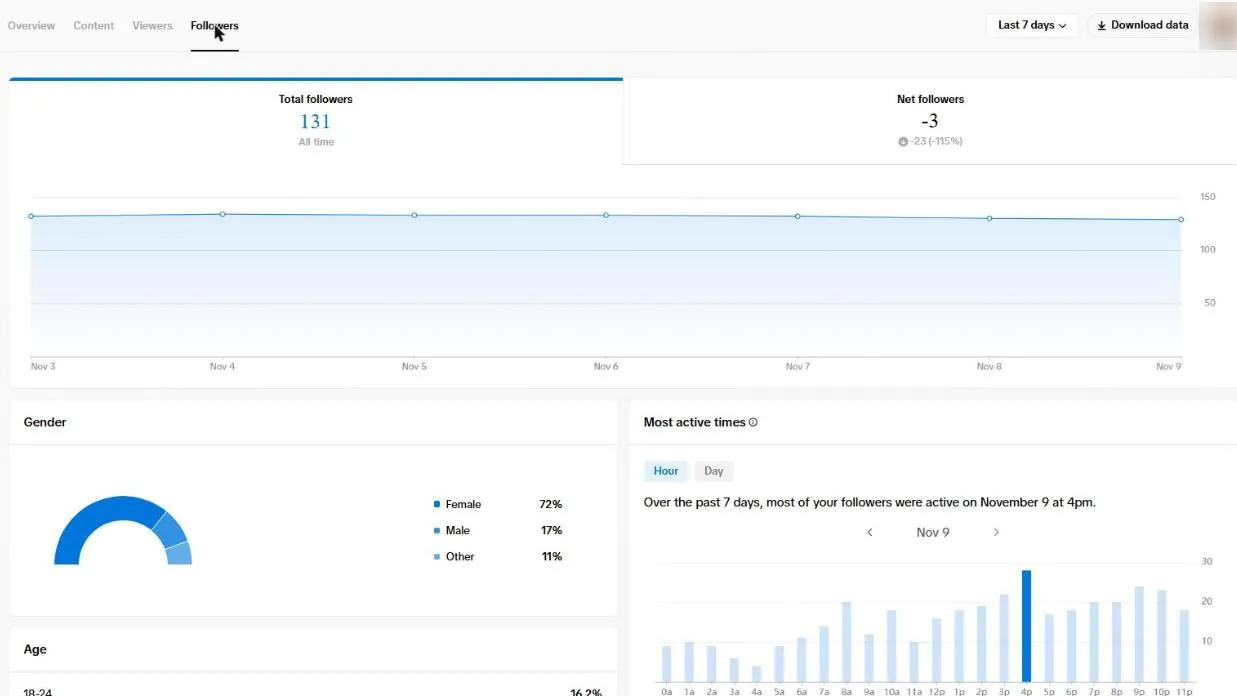
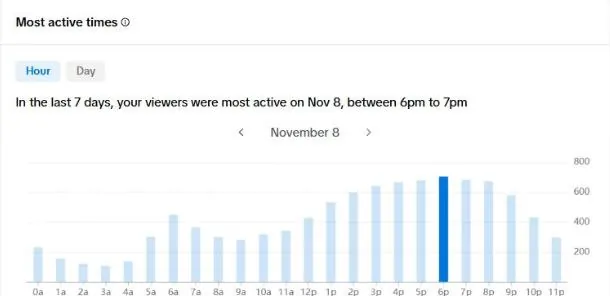
Method 1: check your audience's active times in TikTok Studio
- Open TikTok Studio (in the app, or at tiktok.com/tiktokstudio on a computer).
- Go to Analytics.
- Open the Followers or Viewers section and find the activity times by hour and day.
- Note the two or three busiest hours on the days you post.
The detail that catches most people is the time zone. Before converting any hour, confirm which zone the chart uses; the simplest way is to compare it with a video whose posting time you know. If the chart and your phone's clock are a fixed number of hours apart, shift every hour by that gap.
An active hour means people are on the app, not that they will watch you. Treat it as the first window to test.
Method 2: read your own past videos
Your past posts are your audience reacting to your content, which makes them the most honest data you have. This is the same check we ran on 213 channels above, done for one account.
- List your last 20 to 30 videos with the day and time you posted each, and its views.
- Group them into windows: morning, midday, afternoon, evening, late night.
- Compare the typical (median) views in each window, not the single best video.
- Look for a window that keeps coming out ahead, not one lucky hit.
Watch out for small numbers. Two evening posts, one of which did well, prove very little. Topic and hook usually outweigh the clock, so compare videos of a similar type (if your topics jump around, settle your TikTok niche first).
Then test for two to three weeks
Choose your two strongest candidate windows and alternate similar videos between them for two to three weeks. Hold everything else steady (format, length, hashtags) so the only thing being tested is the time. Keep the winner, then put it up against a new window.
Who is scrolling TikTok in the US (and when)
The studies give average times; your audience's age and daily routine set your real one. Pew Research Center's 2026 numbers show how young and how habitual the US TikTok audience is:
| US TikTok fact | Number | What it means for your posting time |
|---|---|---|
| US adults who use TikTok (2025) | 37%, up from 21% in 2021 | Every hour has viewers; the question is whether they are yours |
| Adults under 30 who use TikTok | 63% | Student and young-worker routines (before class, lunch, evenings) matter most |
| Teens aged 13 to 17 on TikTok (US) | 68% | After-school hours are busy for teen-heavy niches |
| Teens on TikTok "almost constantly" | 21% (survey Sep to Oct 2025) | Teen audiences scroll across the whole day, so weekend tests are worth it |
| Adult users who have posted a video at least once | 52% | About half of the people watching are not posting, so they are watching others |
Sources: Pew Research Center, 8 facts about Americans and TikTok (2 Mar 2026).
When your followers skew older, Sprout Social's weekday working-hours windows may fit better; when they skew toward students, Buffer's early-morning and late-evening slots deserve a test.
Time zones: posting for a US audience
The continental US spans four main time zones, so one posting time lands at four different local hours:
| Eastern (ET) | Central (CT) | Mountain (MT) | Pacific (PT) |
|---|---|---|---|
| 9 a.m. | 8 a.m. | 7 a.m. | 6 a.m. |
| 1 p.m. | 12 p.m. | 11 a.m. | 10 a.m. |
| 6 p.m. | 5 p.m. | 4 p.m. | 3 p.m. |
| 9 p.m. | 8 p.m. | 7 p.m. | 6 p.m. |
Most of Arizona does not change its clocks in summer, so from March to November it matches Pacific time.
If your analytics show your followers clustered on one coast, post for that coast. If they are spread out, a late-afternoon or early-evening Eastern post reaches the East Coast after work while the West Coast is still in its afternoon. And if a large share of your audience lives outside the US, your TikTok Studio activity chart will show it: follow the chart, not the US-based studies.
Does posting time matter as much as people say?
It matters mainly in the first hours. TikTok's tips for creators explain that engagement on a new video usually peaks shortly after posting, and that the video keeps performing for a couple of days (TikTok Newsroom). A good slot gives a video a better start; it does not decide whether people keep watching.
TikTok also said that posting more videos does not change how the For You feed treats your content (same source). Posting more often at "perfect" times will not rescue a video people swipe past. If your timing is reasonable and views are still flat, the cause usually lies elsewhere, most often in the first seconds of the video.
Common posting-time mistakes
- Reading the chart in the wrong time zone. Match the chart against one of your videos with a known posting hour before you move your schedule.
- Judging a slot after one hour. A video keeps picking up views for a couple of days, so compare slots after about 48 hours.
- Changing the time and the video at once. If you switch hours and also switch format or hook, you cannot tell which change mattered.
- Copying one study's single best slot every day. Buffer's Sunday 9 a.m. is an average across millions of posts, not a daily schedule for your account.
- Trusting one lucky video. One hit at 8 p.m. is not a pattern; look at the typical views across several posts per window.
How InayaFlow finds your best time to post
Method 2 works by hand, but it is slow, and one lucky video can fool you. InayaFlow runs it on your own channel.
The free channel analysis looks at the views, likes, comments and shares on your latest videos and tells you what is working on your account. On Pro, the Best Posting Times tool takes each day of the week, splits it into eight three-hour windows in your local time, and ranks them by the views of your own best-performing videos, so one strong video at 6 p.m. counts for more than a pile of average ones at noon. When a day lacks enough of your own data, it says so and shows a clearly labeled general benchmark instead of inventing numbers.
You still choose the time and post yourself; InayaFlow never posts for you. It works from views and engagement, not watch time, so check retention in TikTok Studio.
Quick checklist
- I picked a starting time from the table for the days I post.
- I checked my audience's active times in TikTok Studio, and I know which time zone the chart uses.
- I compared my own past videos by posting window, using typical views, not my single best video.
- I am testing two windows for two to three weeks with similar content.
- I am judging each video after a couple of days, not after the first hour.
Bottom line
Use the studies to pick a starting point, not a finish line. Buffer and Sprout Social disagree on days and hours, our own data on 3,338 creator videos shows only small differences between slots, and all three are honest about their own samples. Your best time to post on TikTok is the window your own audience keeps rewarding, and you find it by checking your analytics and testing. Timing helps a good video meet people at the right moment; the bigger levers, from the hook to watch time, are in our guide to more views on TikTok.
Frequently asked questions
What is the best time to post on TikTok?
No single time works for every account. Buffer's analysis of 7.1 million posts (2026) ranked Sunday at 9 a.m., Monday at 1 p.m. and Sunday at 1 p.m. highest, while Sprout Social's 2026 data favored Tuesday to Thursday between 2 and 6 p.m. local time. In our own data on 3,338 creator videos, no hour clearly beat the rest. Start from the studies, then follow your own TikTok Studio chart.
What is the best day to post on TikTok?
The big studies disagree: Buffer found Saturday best, Sprout Social found midweek strongest and Sunday weakest. In our data, Wednesday had the highest share of videos outperforming their channel's median views (51.5%) and Sunday the lowest (44%), but the gaps were small and we did not test them for statistical significance. Test days on your own account.
What is the best time to post on TikTok today?
Look up today's row in the by-day table in this guide, or open our free best-time-today tool, which shows today's slots in your own local time. Then check your followers' busiest hour in TikTok Studio and post a little before it.
Is it bad to post on TikTok late at night?
Not in our data. Videos posted between 9 p.m. and midnight local time outperformed their channel's median views 49.3% of the time, and those posted between midnight and 3 a.m. did so 51.3% of the time, both close to the 47.6% baseline. Late posts only hurt if your own audience is asleep, which your TikTok Studio chart will show.
Does the time you post on TikTok really matter?
Mostly for the first hours. TikTok says new videos usually peak in engagement soon after posting and keep performing over a couple of days. A strong video posted at an odd hour can still find viewers; a good slot just gives it a better start.
How do I see when my TikTok followers are online?
Open TikTok Studio, go to Analytics, and look at the activity times in the Followers or Viewers section, shown by hour and day. Confirm the chart's time zone first, for example against a video whose posting time you know.
Sources
- Buffer: Best time to post on TikTok (September 14, 2026)
- Sprout Social: Best times to post on TikTok (March 31, 2026)
- InayaFlow: TikTok Benchmarks 2026: What 213 Channel Analyses Show (November 11, 2026)
- TikTok Newsroom: 5 tips for TikTok creators (July 30, 2020)
- Pew Research Center: 8 facts about Americans and TikTok (March 2, 2026)