Published ·Updated ·By the InayaFlow team ·9 min read
Why Is My TikTok Getting No Views? How to Fix Views Stuck at 0 or 200
Views stuck at 0, or never past a couple of hundred? Work through these checks in order, from TikTok's own eligibility rules to your hook and timing.
Key takeaways
- TikTok Newsroom (2020): For You recommendations generally pull from videos posted in the last 90 days, and performance extends over a couple of days.
- TikTok for Business (2020, measured on ads): over 63% of the highest click-through videos showed their key message in the first 3 seconds.
- TikTok for Business (2020): vertical videos had an average 25% higher 6-second watch-through rate.
- Pew Research Center (2026): the most active 25% of US adult users made 98% of public videos, so steady posters stand out.
- TikTok says follower count is not a direct factor in recommendations, so a new account can still be shown on For You.
On this page
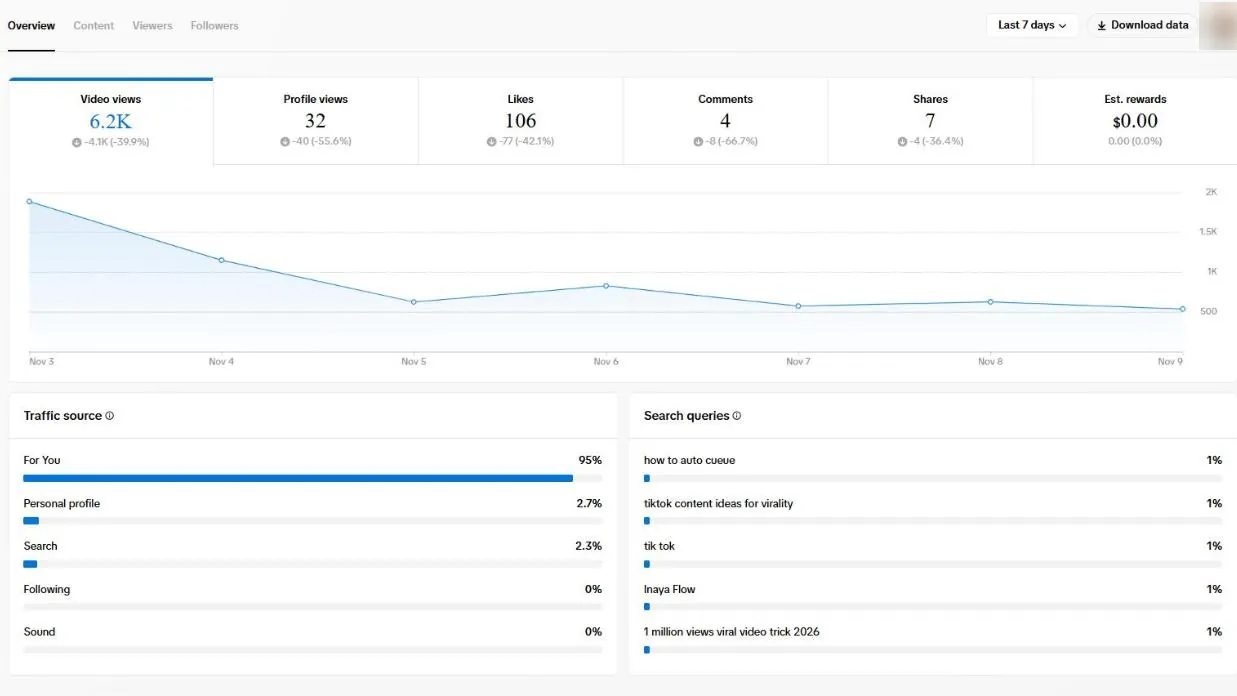
If your TikTok is getting no views, the cause is almost always one of two kinds: the video is not being shown (a setting, a review or an eligibility decision), or it is being shown and people swipe away. Views stuck at exactly 0 point to the first kind. Views stuck at a few hundred point to the second. Work through the checks below in that order, because the first group takes two minutes and the second takes real work.
One thing to know before you start: TikTok says follower count is not a direct factor in what it recommends (TikTok Newsroom). A small account is not locked out. That is good news, because it means the fix is usually something you can change.
First: are your TikTok views stuck at 0 or around 200?
| What you see | What it usually means | Start with |
|---|---|---|
| 0 views for hours | The video is not being distributed yet, or is not allowed to be | Checks 1 to 5 |
| A handful of views, then nothing | It was shown, and early viewers did not stay | Checks 6 to 8 |
| Every video stops around 200 to 300 | A pattern in your content, not a one-off | Checks 6 to 9 |
| Views suddenly dropped on every video | Check your account status first, then the content | Checks 4, 5, then 6 to 9 |
Why your TikTok views are stuck at 0
1. The video is private, or "who can watch" is limited
It sounds obvious, but check it first. Open the video, tap the three dots, and look at the privacy setting. If it says Only you or Friends, the For You feed will never show it. Also check your account itself: TikTok sets accounts of people under 16 to private by default (TikTok youth safety).
2. It is still processing or under review
TikTok's recommendation system only picks from videos that have passed its initial content moderation (TikTok, recommendation system overview). If your video is still processing or in review, it simply is not in the pool yet. Give it time before you change anything.
3. The account belongs to someone under 16
TikTok states that content created by an account aged under 16 is not eligible for recommendation in the For You feed (TikTok, recommendation system overview; youth safety policy). If the birth date on the account is under 16, the For You feed is off for those videos by design.
4. The post was made ineligible for the For You feed
TikTok has For You feed eligibility standards: some content can stay on TikTok but will not be recommended. When that happens, TikTok's Help Center says the post won't be displayed in the For You feed, and you can see the decision in the post's analytics (analytics must be turned on), review the reason, and appeal if you think it is a mistake. A successful appeal makes the post eligible again (TikTok Help Center, content violations).
One category catches many small creators: TikTok's guidelines list unoriginal or reused material without anything new as ineligible for the For You feed (TikTok, integrity and authenticity). Re-uploading someone else's clip, a compilation with nothing added, or a video carrying another app's watermark are the usual suspects. Add something of your own: commentary, a reaction, your own footage.
5. Your account has warnings or strikes
If views dropped on every video at once, check your account. TikTok keeps a record of violations in account check and account status, and strikes expire after 90 days (TikTok Help Center). If something is listed, read the reason and appeal if you disagree. Tools that follow, like or comment for you also break TikTok's rules on fake engagement; our guide to which growth tools and services are safe shows how to tell them apart.
About "shadowbans": TikTok does not use the word. It does say that a video getting few views does not necessarily mean it broke a rule (For You feed eligibility standards). Our free TikTok shadowban checker walks you through TikTok's own notices for checks 4 and 5. If checks 1 to 5 come back clean, you are not being punished. The video is being shown and is not holding people, which is what the next checks are for.
Why your TikTok views are stuck around 200 or 300
If your videos get a few hundred views and stop, TikTok is showing them, and the people who see them are not giving it a reason to show them to more. TikTok's recommendation system predicts what a viewer will do with a video: whether they will watch for a while, finish it or skip it, like, share or comment (TikTok, recommendation system overview). Low numbers mean those early viewers mostly moved on.
A few hundred views is also where most small creators sit: in our TikTok benchmarks study of 213 channels, the median channel's typical video got 280 views.
6. The first seconds do not give people a reason to stay
This is the most common cause. Watch your own video as a stranger would, with the sound off. In the first second, is it clear what the video is and why you should keep watching? If you open with "hey guys", a logo, or a slow setup, most viewers are gone before the good part. Lead with the most interesting moment, the result, or the question. Our guide to TikTok hooks that stop the scroll has seven patterns to try.
Check this in TikTok Studio: the post's analytics show how long people watched. If most viewers leave in the first few seconds, the opening is the problem, not the topic.
7. TikTok and viewers cannot tell what the video is about
TikTok uses video information such as captions, sounds and hashtags as signals (TikTok Newsroom). A caption like "lol" with #fyp #viral tells nobody anything. Say the topic out loud early, put it in on-screen text, write a plain caption with the words people would search for, and use 3 to 5 hashtags that describe the video. Our TikTok hashtag guide explains the current five-hashtag limit and how to pick them, and our dated list of trending TikTok hashtags shows which trends are rising right now.
If your channel jumps between unrelated topics, viewers who liked one video have little reason to watch the next. Narrowing down helps; see how to find your TikTok niche.
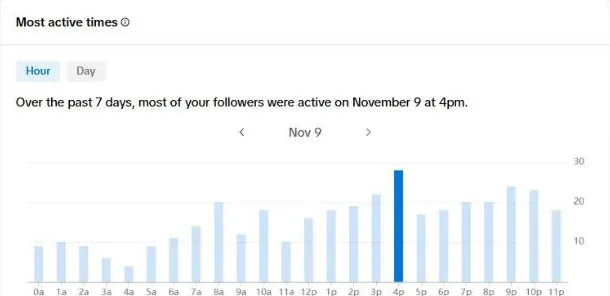
8. You posted when your audience was not around
TikTok says new videos generally see a peak in engagement soon after they are published (TikTok Newsroom, 5 tips for TikTok creators). If you post at 3 a.m. for an audience that is asleep, the video gets its first chance in front of fewer people. Check when your followers are active in TikTok Studio, and see the best time to post on TikTok for a starting point and a simple test.
9. You are judging too early, or posting more instead of better
The same TikTok tips say a video's performance extends over a couple of days, and that the number of videos you post does not affect how your content is recommended in the For You feed (TikTok Newsroom). So two habits work against you: deciding a video failed after an hour, and responding to low views by posting the same kind of video more often. Give each video two or three days, and change one thing at a time. Once the basics are clean, our main guide on how to get more views on TikTok ranks the 11 fixes that matter most.
TikTok views: the numbers behind the checks
These are the published numbers that sit behind the checks above. Each one tells you where to look first.
| Fact | Number | Source |
|---|---|---|
| How far back For You usually looks | Videos posted in the last 90 days | TikTok Newsroom, Jul 2020 |
| How long a video keeps getting views | Performance extends over a couple of days | TikTok Newsroom, Jul 2020 |
| Key message early | Over 63% of the highest click-through videos showed it in the first 3 seconds | TikTok for Business, Oct 2020 (ads) |
| Vertical video | Average 25% higher 6-second watch-through rate | TikTok for Business, Oct 2020 (ads) |
| Length | Videos longer than five seconds tend to perform better | TikTok Newsroom, Jul 2020 |
| Who posts on TikTok | The most active 25% of US adult users made 98% of public videos (2023 study) | Pew Research Center, Mar 2026 |
Sources: TikTok Newsroom, 5 tips for TikTok creators (30 Jul 2020), TikTok for Business, 9 creative tips (21 Oct 2020, measured on ads) and Pew Research Center, 8 facts about Americans and TikTok (2 Mar 2026).
The first-seconds numbers are why check 6 matters so much: our guide to TikTok hooks that stop the scroll has seven openings to try.
A 10-minute diagnosis you can do today
- Open your last 10 videos in TikTok Studio.
- For each one, write down: views, how long people watched, likes, comments, shares, saves, and the day and time you posted. To turn the likes, comments, shares and saves into one comparable number, run them through our TikTok engagement rate calculator.
- Any video at 0? Run checks 1 to 5 on it.
- For the rest, sort by views. What do your top three have in common that your bottom three do not? Look at the first second, the topic, the format, the caption, and the posting time.
- Pick one difference and make your next three videos with it.
This is slow by hand, and it is easy to see a pattern that is not there. But it is the honest way to find out what your own audience responds to.
How InayaFlow helps when your views are stuck
InayaFlow does the comparison in step 4 for you. Type your TikTok username and the free channel analysis reads your recent videos: views, likes, comments and shares, and, where a transcript is available, what you actually say in them. It gives you your strengths, your weak spots and three specific recommendations, based on your own numbers, in about 30 seconds and without a password.
Two honest limits, so you know where to look instead: InayaFlow cannot see watch time or retention (check those in TikTok Studio), and it cannot see TikTok's eligibility decisions or account warnings (checks 1 to 5 above happen inside the TikTok app). It is built for the "my videos get shown but do not take off" problem, which is the one most creators have.
On Pro, the same channel data feeds content ideas, ready-to-film scripts, hashtags and your best posting times. You still film and post everything yourself.
Checklist: TikTok getting no views
- The video is public, and my account is not set to private.
- The video finished processing and is not under review.
- The post's analytics do not show "ineligible for the For You feed" (or I appealed).
- My account check shows no warnings or strikes.
- The first second shows what the video is and why to keep watching.
- The topic is in my words, on-screen text, caption and 3 to 5 accurate hashtags.
- I posted when my audience is active.
- I am judging after two or three days and changing one thing at a time.
Bottom line
Zero views is usually a setting, a review or an eligibility decision, and you can check all of them in a few minutes inside TikTok. Low views that stop around a couple of hundred are TikTok telling you early viewers did not stay. That is fixable, starting with the first second of your next video.
Views also decide whether TikTok will ever pay you for a video. If that is your goal, see who qualifies for the Creator Rewards Program and which views count toward it.
Frequently asked questions
Why does my TikTok have 0 views?
Usually because the video is not being shown yet or is not allowed to be recommended. Check that it is public, that it is not still processing or under review, and open the post's analytics to see whether TikTok marked it ineligible for the For You feed. Accounts of users under 16 are also not recommended in the For You feed.
Am I shadowbanned on TikTok?
TikTok does not use that word. What it does have is For You feed eligibility: a post can stay up but not be recommended, and you can see that decision in the post's analytics and appeal it. TikTok also says that a video getting few views does not necessarily mean it broke a rule.
How long does it take for a TikTok to get views?
TikTok says new videos generally peak in engagement soon after they are published, and that performance extends over a couple of days. Give a video at least two or three days before you judge it.
Will posting more often fix low views?
Not by itself. TikTok has said the number of videos you post does not affect how your content is recommended in the For You feed. Fix the cause first, then post consistently.
Does follower count decide how many views I get?
Not directly. TikTok says neither follower count nor past high-performing videos are direct factors in its recommendation system. A small account can still get views if people watch and engage with the video.
Sources
- TikTok Newsroom: How TikTok recommends videos #ForYou (June 18, 2020)
- TikTok Newsroom: 5 tips for TikTok creators (July 30, 2020)
- TikTok for Business: 9 creative tips to drive auction ad performance (October 21, 2020)
- Pew Research Center: 8 facts about Americans and TikTok (March 2, 2026)