Published ·By the InayaFlow team ·8 min read
How to Choose a TikTok Analytics Tool: What to Look For (2026)
Do you need a TikTok analytics tool? A 6-question checklist, what native analytics already covers, tool types and prices, and red flags to avoid.
Pick a TikTok analytics tool by the job you need done, not by a "best of" list. Start with TikTok's free analytics, and add a paid tool only when you hit a gap it cannot fill, such as history longer than a year, competitor comparison, or reports for clients. This guide gives you six questions to decide, what each type of tool does, the prices three 2026 comparisons list, and the red flags to avoid.
Try it on your own account: type a TikTok username to see its engagement rate from its recent videos.
Engagement rate by views
—
Add your likes, comments, shares or saves.
Engagement rate by followers
—
Add your likes, comments, shares or saves.
Want to know why your TikTok numbers look like this?
Type your TikTok username and InayaFlow compares your own recent videos: your typical views, your engagement rate, what is working and what to post next. Free, no password needed. It starts with no account; a free account unlocks the full report.
Open the full TikTok engagement rate calculator.
Key takeaways
- Sprout Social, SocialPilot and Socialinsider (2026 tool lists) all start from the same point: TikTok's own free analytics is the baseline, and a paid tool is worth it only for something it lacks.
- Socialinsider (Oct 2026): native TikTok history is capped at one year, so long-run comparison is one real reason to add a tool.
- SocialPilot (prices checked Sep 2026): starting prices in its list run from free to $330 a month, so the job you need done matters more than the brand.
- Public-profile tools estimate from what anyone can see. They cannot show private data such as watch time or traffic sources.
- Test any tool on your own last 10 videos before paying: if it tells you nothing you did not already know, skip it.
On this page
Do you need a tool at all?
Probably not on day one. All three comparisons we read treat TikTok's own analytics as the starting point. Socialinsider, itself a paid tool, says TikTok's native analytics only lets you look back about a year. SocialPilot has a section called "When TikTok's native analytics is enough". That is a vendor admitting its own category is optional for some people.
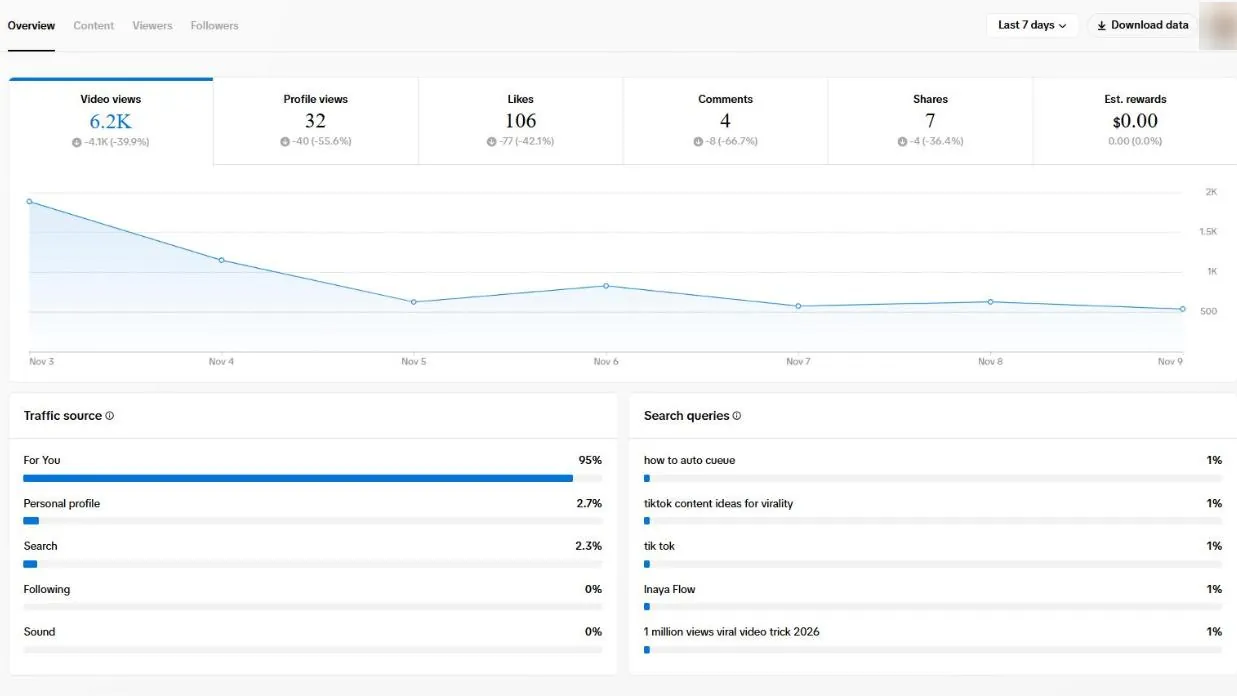
TikTok's own tutorial lists what the built-in analytics shows: views, a followers tab and per-video detail such as watch time and traffic sources (TikTok Newsroom, 14 Aug 2020). Menus have changed since 2020, so check our guide to reading your TikTok analytics for where things sit today.
You probably do not need a tool if:
- You post for yourself and check your numbers once a week.
- Your questions are "which video did best?" and "is my audience growing?"
- You have been on TikTok for under a year.
You may need a tool if:
- You want to compare against other accounts.
- You manage several accounts or report to a client.
- You want to keep history beyond the native window.
- You want help deciding what to post, not only a chart of what already happened.
The six questions that pick the tool
Sprout Social's list names three things to look for: trend analysis, streamlined reporting and hashtag tracking. Socialinsider adds that features, price, integrations and recommendations are what marketers rank when choosing. SocialPilot says to pick the job first. Put together, six questions cover it.
1. What is the one job?
Write it in one line. "I want to know why my views dropped." "I want to see what competitors post." "I want a monthly report." If you cannot write one line, you are shopping for features, not a result.
2. Whose data will it read?
A tool that reads your own account (after you connect it) can show more than one that reads only public profiles. A public-profile tool can see views, likes, comments, shares and follower counts that anyone sees. It cannot see watch time, retention or traffic sources.
3. How far back do you need to look?
Native history is capped at about a year, per Socialinsider. If you want two years of trend lines, a tool that stores history for you has a real edge. Socialinsider says its own history reaches up to two years, and that its free TikTok Audit covers only the past 30 days.
4. Do you need to publish, or only measure?
SocialPilot separates all-in-one suites that schedule posts from tools that only report. If you already schedule somewhere else, do not pay twice. If you want one place for both, an all-in-one suite can be cheaper than two tools. Note that InayaFlow never posts for you, and posting stays manual.
5. What does it cost, per person and per account?
Some tools price per seat, some per profile. A solo creator and a ten-person agency need different plans. Section three has the numbers.
6. Can you try it on your own videos first?
A free plan, a trial or a money-back window lets you test. Run your last 10 videos through it. Before you start, write down what you hope to learn. After a week, ask whether you learned it faster than in TikTok Studio.
Types of TikTok analytics tools
SocialPilot groups tools by the job they do. We use the same groups here, with our own plain wording.
| Type | Best for | What it usually adds | What it cannot do |
|---|---|---|---|
| TikTok's native analytics | Your own account, free | First-party views, followers, per-video detail | Long history, competitors |
| All-in-one social suites | Teams posting on several platforms | Scheduling plus reporting | Deep TikTok-only trends |
| Competitor benchmarking | Brands and agencies | Compare accounts and industry averages | Your private data |
| Trend and hashtag discovery | Choosing topics and tags | What is rising now | Tell you why your own videos did well |
| Influencer vetting | Brands hiring creators | Audience and fake-follower checks | Help you grow your own channel |
| Public profile lookups | Quick checks of any account | Free numbers from public pages | Private metrics |
| Creator coaching tools | Creators deciding what to post | Pattern analysis of your own videos | Replace TikTok Studio |
The type matters more than the brand. A creator hunting for ideas who buys an influencer-vetting tool has bought the wrong category, however good it is.
What the tools cost
Prices below are the starting prices in SocialPilot's 2026 comparison, checked by SocialPilot in September 2026. We did not verify them ourselves. Vendors change plans often, and SocialPilot warns that buyers should confirm on each pricing page. SocialPilot also sells a tool, so it is a vendor list, not a neutral test.
| Tool | Starting price in that list |
|---|---|
| Countik | Free, no login |
| Exolyt | Free Basic plan; Essential $330 a month billed annually |
| Iconosquare | Free plan; Starter from $13 a month |
| MaveKite | From $9 a month |
| SocialPilot | From $30 a month |
| Fastmoss | From $49 a month |
| Sprout Social | From $99 per seat per month |
| Socialinsider | From $99 a month |
| Rival IQ | From $239 a month |
| Brand24 | From $249 a month |
| Keyhole, HypeAuditor | Quote only |
Two things stand out. First, the spread is large: from free to several hundred dollars a month for a tool that can look similar on the feature page. Second, the expensive ones are built for brands and teams. A solo creator under 10,000 followers rarely needs anything above the first few rows.
One entry in the page we read gave two different first-month prices for Fastmoss. That is a reminder that tool lists, ours included, can contain mistakes, so look at the vendor's page before paying.
What to ignore on a features page
Big dashboards
A dashboard with 40 charts is not a result. If you cannot name the one decision it helps you make, it is decoration.
"Follower growth" promises
Analytics tools measure. They do not grow your account. A tool that promises more followers or views is selling something other than analytics.
Metrics the tool cannot really see
If a tool does not ask you to connect your account and still shows your watch time or audience age, ask where those numbers come from. Private metrics belong to the account owner. Public tools estimate.
Survey rankings as proof
Socialinsider's survey says features ranked first with 70.2% of respondents, then price at 52.2%, integrations at 34.3% and recommendations at 25.4%. The survey is the vendor's own and undated, and it is of marketers, not creators. Use it as a hint about what buyers care about, not a rule.
A 7-day test for any tool
Run this before you pay for a tool.
- Day 1: write the one job and three questions the tool must answer.
- Day 1: note your last 10 videos' views in a sheet, so you can check the tool's numbers against TikTok Studio.
- Day 2: connect or look up your account. Check the views, likes, comments and shares match TikTok Studio within a small margin. A big gap is a red flag.
- Day 3: ask the three questions. Did you get a clear answer in under five minutes?
- Day 4 to 6: use the tool to decide one post. Did it change what you made?
- Day 7: decide. If the tool did not change a decision, cancel before the trial ends.
Our engagement rate calculator is a free way to cross-check the numbers a tool shows: type in views, likes, comments and shares and compare.
How to read what a tool tells you
A tool is only useful if you act on it. In our viral study of 10,124 trending US videos, the 766 over 1M views took 66.8% of all views, so a tool that shows one average hides most of the picture. Pick one that judges you against your own size, not against accounts with millions of views. If a tool compares a 400-view account with a 4-million-follower brand, the comparison teaches you nothing.
Look for three outputs:
- Best versus typical video. The gap tells you whether you have a repeatable format or a one-off.
- Pattern across your videos. Topic, hook, length, posting day.
- One next step. Not 20 recommendations. One.
For the "why did that video work" question, our 7-step viral teardown works with no tool at all.
How InayaFlow helps with this
InayaFlow fills the "what should I film next" gap, not the reporting gap. Enter a TikTok handle (no password) and the free Channel Analysis reads the public profile in about 30 seconds. You get the totals, recent performance, a best-versus-typical comparison, your niche, a short summary, plus the first strength and first area to improve. Making a free account opens the remainder of the report.
The paid tools sit on that same channel memory: Content Ideas, Write My Script, Hashtags, Best Posting Times and Video Analysis, where you paste any video to see why it worked. They work from what InayaFlow can read in your videos: views, likes, comments, shares, saves and the spoken words.
Know the limits. There is no watch time, retention or completion rate here, and InayaFlow never posts for you. TikTok Studio stays the place for those numbers. Use InayaFlow as the second tab you open after Studio, when you want the data turned into a plan. It takes about five minutes a day and promises no views. Run the free analysis on your own channel and judge it there before you spend anything else.
Checklist before you pay
- I wrote the one job in one line.
- I read what TikTok's own analytics already shows for that job.
- The tool's numbers match TikTok Studio on my last 10 videos.
- I know exactly which data is public and which is private.
- The price fits per seat or per account, with a trial or a cancel window.
- It tells me one next step, not a wall of charts.
If you cannot tick all six, wait. For most creators the best first move is free: read your own stats with the TikTok analytics guide, and see whether you need a growth tool at all. Then analyze your channel free.
Frequently asked questions
Do I need a TikTok analytics tool?
Most solo creators do not need one to start. TikTok's own analytics is free and, per the three tool comparisons we read, is the baseline every paid tool is measured against. Add a tool when you hit a gap, such as history older than a year, competitor comparison or reporting for a client.
What is the best free TikTok analytics tool?
TikTok's own analytics is the free option with the most data on your own account, because it is first-party. For a public account you do not own, free lookups such as Countik exist, and Socialinsider offers a free TikTok Audit that looks at the past 30 days. Free public tools estimate from visible numbers.
Can a third-party tool show my watch time or retention?
Only if you connect your account through an approved route, and what you can see depends on the tool. Tools that read public profiles cannot see watch time, retention or traffic sources, because those numbers are private to the account owner. InayaFlow does not have watch time or retention either, and says so.
How much does a TikTok analytics tool cost?
SocialPilot's 2026 list, with prices checked in September 2026, shows entries from free plans through about $13, $30, $99 and $249 a month up to $330 a month billed annually, and some are quote-only. Prices change often, so check the vendor's page.
How do I test a TikTok analytics tool before paying?
Load your last 10 videos, write down three questions you want answered, such as which video type wins and which videos are your best versus typical, and see if the tool answers them faster than TikTok Studio. Use a free trial or free plan where one exists.
Sources
- Sprout Social: 13 TikTok analytics tools to boost your strategy in 2026 (November 23, 2026)
- SocialPilot: 11 TikTok Analytics Tools to Optimize Your Strategy in 2026 (September 30, 2026)
- Socialinsider: Top 10 TikTok Analytics Tools In 2026: Tested & Compared (October 16, 2026)
- TikTok Newsroom: Product tutorial: TikTok Analytics (August 14, 2020)
- InayaFlow: InayaFlow viral TikTok study 2026 (22,767 trending videos) (November 27, 2026)