Published ·By the InayaFlow team ·9 min read
TikTok 'Not Eligible for the For You Feed': What It Means, Why It Happens and How to Fix It
A video marked not eligible for the For You feed stays on your profile but is not recommended. How to find the notice, the causes, and what to do next.
A TikTok video that TikTok keeps out of For You recommendations is still public on your profile, but TikTok will not recommend it to strangers. TikTok's Help Center says the post is kept out of the feed. You can see the notice in the post's analytics, and you can appeal from there.
Try it on your own account: type your TikTok username for a free report on your recent videos.
Key takeaways
- TikTok Help Center: a post deemed ineligible is not shown in the feed. It stays on your profile, and the notice sits in that post's analytics.
- TikTok Help Center: you appeal from the notice in the post's analytics. TikTok states no deadline for the appeal and no response time.
- TikTok Help Center: account strikes 'will expire after 90 days'.
- Third-party guides (Shortimize, Lilach Bullock, GoFaceless): low views alone are not proof. No notice in the analytics means the video is underperforming, not blocked.
- InayaFlow viral study (10,124 trending US videos): only 7.6% passed 1M views, so a quiet video with no notice is normal.
On this page
The wording scares people, and it is easy to confuse with ordinary low views. They are two different things. This guide shows how to tell them apart, where the notice lives, the reasons creators and guides give, what you can do, and what to leave alone. If your views are simply down and you have no notice, our main guide on how to get more views on TikTok is the better place to start.
What the notice means
TikTok separates three decisions that people lump together as "banned":
| Decision | What happens | Where you see it |
|---|---|---|
| Removal | The video is taken down | Inbox, System notifications, Account updates |
| Not eligible for For You | The video stays up but is not recommended | The post's analytics |
| Account restriction or ban | Features or the whole account are limited | Account updates, Account check |
TikTok's violations page says such a post is kept out of the feed, and that winning an appeal makes it eligible again (TikTok Help Center). GoFaceless adds that the post stays published, so followers can still open it, and that recommendation eligibility is a separate decision from removal (GoFaceless).
TikTok's For You feed standards page explains the idea in one line: it makes ineligible "certain content that may not be suitable for a broad audience" (TikTok Community Guidelines). That page does not list every category on the page we read, because the categories sit in "FYF ineligible" sections elsewhere in the Community Guidelines. We found no public count of how many videos get this label.
Do you actually have the notice?
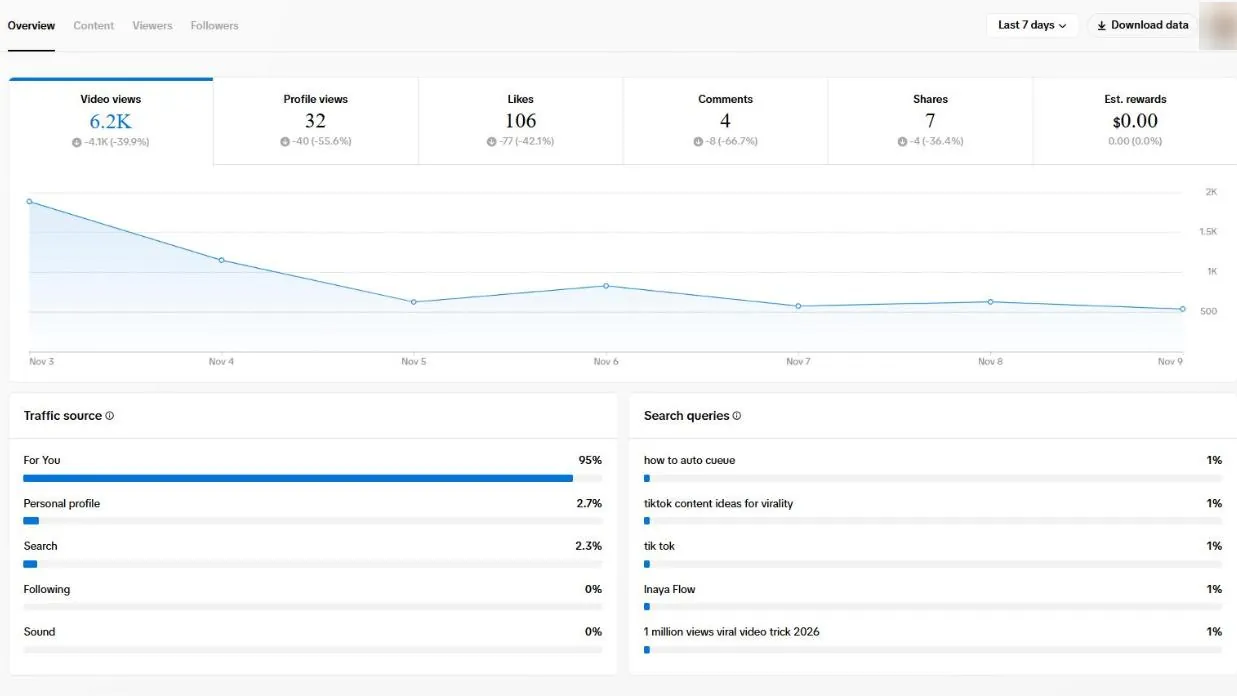
Check this before anything else. Low views do not prove a restriction. Shortimize points out that TikTok's own standards page says a video with few views does not necessarily break a rule, and it lists four situations that look like suppression but are not all the same thing (Shortimize):
- One video was made ineligible for For You.
- The whole account is not being recommended.
- The video has an age or audience limit.
- Nothing is restricted and viewers simply moved on.
Context matters for number 4. In our viral study of 10,124 trending US videos, only 7.6% passed 1M views and the 766 that did took 66.8% of all views. If your recent videos are quiet and no notice exists, you are looking at normal TikTok, not a label.
How to find the notice, step by step
TikTok's Help Center gives the route. You must have analytics switched on first.
Check one video
- Open the post in the TikTok app.
- Tap More insights, or tap More options and then Analytics.
- Look for a notification about the post and tap it.
- If you disagree with the decision, tap Appeal.
Check your whole account
- Go to Profile, then the menu, then TikTok Studio.
- Open Account check under More tools. Shortimize describes a tick as all clear and a warning sign as a problem.
- Open Inbox, tap the system notifications, and open the account updates tab for any violation notices.
If you cannot find analytics or the Account check page, our guide to checking your TikTok account status walks through each screen.
Check the settings that look like a ban
Lilach Bullock lists privacy settings as a common cause of "no one sees my videos." It says a private account is never recommended, and that "Suggest your account to others" must be on (Lilach Bullock). Give a changed setting a day or two before you judge it. Shortimize adds that age-restricted posts are shown only to people 18 and over, which narrows the audience without removing the video.
Why a video becomes ineligible
TikTok does not give a reason for each decision in public, so treat these as the reasons the sources name, not a checklist TikTok publishes.
| Reason | Who says it | How sure is it? |
|---|---|---|
| Content that breaks For You feed standards | TikTok, Shortimize, Media Mister | Official, but the detail varies by rule |
| The video was reviewed again after it grew | Shortimize | A claim without an official page |
| The account posts many ineligible videos | Shortimize | A claim without an official page |
| Undisclosed ads or brand deals | Shortimize | A claim without an official page |
| Copyrighted music or footage | Search summaries of third-party guides | Unverified |
| A TikTok mistake | Shortimize | Plausible; it is why appeals exist |
Media Mister, a company that sells TikTok views, lists low engagement, poor video quality and "banned or overused hashtags" as reasons (Media Mister). It cites no data for those, and low engagement is a result of not being recommended, not a reason for an ineligible label. We would treat that list as ideas to check, not as causes.
A related point from TikTok's standards page: it says the recommendation system tries not to show some kinds of content over and over, and its examples include extreme fitness or dieting, sexual suggestiveness, sadness and overgeneralized mental health advice. That is about repetition in a viewer's feed, not a formal ban.
What to do if you have the notice
Step 1: read what it says
Note the date, the post and the wording. Compare it with the Community Guidelines. GoFaceless says the guidelines that took effect on 13 September 2025 are the current ones, and that TikTok's head of trust and safety said it is "easy for creators to appeal removals or restrictions."
Step 2: appeal once, with specifics
Open the notice and tap Appeal. TikTok states no deadline and no answer time, and every time you read in a guide is a guess. Keep the video published while TikTok reviews it. GoFaceless warns that deleting it ends the matter. A good appeal says three things: which video, which rule you think was misapplied, and what shows the video follows the rules (your own footage, a licence for the sound, a source for a claim). Our guide to appealing a TikTok ban has a short template.
Step 3: do not expect views to snap back
GoFaceless says a successful appeal restores eligibility but does not promise reach, and that a post restricted early may have missed its first testing window. Treat a win as "allowed again", nothing more. Our guide to the TikTok algorithm explains how recommendations work and what TikTok has said about them.
Step 4: learn from it
If the appeal fails or you accept the call, treat the stated reason as a brief for the next video. Strikes also matter: TikTok says account strikes "will expire after 90 days", so a clean run does count. How TikTok strikes work shows what is counted.
How long does it last?
TikTok does not say. Its violations page gives no duration for an ineligible decision and no deadline for an appeal. Shortimize says TikTok gives no fixed recovery time for restricted accounts and that an account may be restored automatically at any time. The only clock TikTok does publish is for strikes, which expire after 90 days. So plan in weeks, not hours: appeal once, keep posting normal videos that follow the rules, and check the analytics of each new post for a notice instead of guessing. If three or four new posts in a row show no notice, the one old label is not spreading.
Also watch for a second kind of delay. Lilach Bullock says to give a changed privacy setting 24 to 48 hours before you judge the result, and says an account under about 30 days old, or one that just passed 1,000 followers, can see a temporary dip. Neither is an ineligible label, so do not treat them as one.
What to leave alone
- Do not buy views or followers. Lilach Bullock lists this among the things that do not fix the problem, and it can add violations.
- Do not make a fresh account to get around it. The same source lists re-registering as a myth.
- Do not post the same video several times in an hour. It does not remove the label and can look like spam.
- Do not pay anyone who promises to "unshadowban" you. No source we read shows that a third party can overturn the decision.
- Do not delete everything. Our piece on deleting TikTok videos shows there is no official statement that deleting helps, and it may erase the notice you need.
One bad video or the whole account?
The fix depends on the answer, and the answer is simple to read in your numbers.
| What you see | What it suggests | Next step |
|---|---|---|
| One video flat, others normal | That post only | Check its analytics for the notice |
| Every recent video flat, no notice | Not recommended as an account, or a normal slump | Account check, then why views go down |
| Notice on several posts | A pattern in what you post | Review the topics they share before the next upload |
| No notice, small steady numbers | Normal range | Work on hooks and topics |
Be careful with outliers. In our viral study, 94.2% of the 707 US creators with a 1M+ video had exactly one in the sample. A single flop beside a big hit is common and is not a sign of a label.
A simple prevention routine
TikTok announced Content Check Lite in July 2025, a check before you post that starts in TikTok Studio on the web, according to Shortimize, which also quotes a 27% drop in low-quality uploads from a similar pre-check for TikTok Shop sellers (attributed to TikTok; we could not open the primary page). The tool does not promise views.
A routine you can run in five minutes a week:
- Open the analytics of each video from the week.
- Look for a notice on every post.
- Compare the week's median views with the usual numbers.
- Check Account check once.
- Write down any wording TikTok gave, so you can see a pattern.
For your own accounts, our shadowban test guide shows how to separate a real restriction from a normal dip, and the shadowban checker compares a username's recent views with its usual views. It is a view-count comparison, not a verdict from TikTok.
Under review is different from the For You notice: see TikTok video under review: how long it lasts.
How InayaFlow helps with this
The notice lives inside TikTok. InayaFlow cannot see it, your strikes or your Studio, and it files nothing on your behalf.
What it can do is answer the question that comes first: is this video really different from your normal results? Put your handle into the free analysis and half a minute later you see how your recent videos compare, which one did best and your niche, using public data only. If one video sits far below the rest, check its analytics. If everything looks like your usual range, the problem is probably not a label. When you start posting again, Pro's idea and script tools build from your own best videos, and Hashtags suggests tags from your own results. You still post by hand.
Bottom line
A video flagged for the For You feed stays online but is not recommended. Open the post's analytics to see whether you have the notice. If you do, appeal once with specific proof and keep the video up. If you do not, your problem is views, not a block. Check your own numbers with the free channel analysis before you change what you post.
Frequently asked questions
What does 'not eligible for the For You feed' mean on TikTok?
TikTok's Help Center says the post is kept out of the feed. The video stays on your profile and followers can still find it, but TikTok will not recommend it to strangers.
Where do I see the notice?
Turn on analytics, open the post, tap More insights (or More options, then Analytics) and tap the notification for the ineligible post. Other violation notices are under Inbox, System notifications, Account updates.
Is a video with low views the same as one that is not eligible?
No. Low views with no notice in the analytics means the video is underperforming, not blocked. TikTok's For You feed standards page also says a video with few views does not necessarily break a rule, according to Shortimize's reading of it.
Can I appeal?
Yes. Open the notice in the post's analytics and tap Appeal. TikTok states no deadline and no answer time. GoFaceless says a successful appeal restores eligibility but does not promise any reach.
Does one ineligible video hurt my whole account?
TikTok does not say that one ineligible video lowers the rest. Shortimize lists 'the account posts many ineligible videos' as one reason an account stops being recommended, so a pattern is the risk, not a single post.
Should I delete the video and post it again?
Lilach Bullock says reposting the same file rarely helps and suggests a clean caption and a cleared sound if you do. We found no TikTok statement that deleting clears a restriction, so appeal first.
Sources
- TikTok: Content violations and bans (November 26, 2026)
- TikTok: For You feed standards (Community Guidelines) (November 26, 2026)
- Shortimize: How to tell if TikTok is suppressing your video (November 26, 2026)
- GoFaceless: How to appeal a TikTok video marked ineligible for the For You feed (November 26, 2026)
- Media Mister: Why your video is not eligible for the For You feed on TikTok (November 26, 2026)
- Lilach Bullock: Why is TikTok not showing my videos to anyone (November 26, 2026)
- InayaFlow: InayaFlow viral TikTok study 2026 (22,767 trending videos) (November 27, 2026)