Published ·Updated ·By the InayaFlow team ·9 min read
How to Check TikTok Account Status (2026)
Where to find Account Check in TikTok Studio, what the notices mean and how to tell a real restriction from plain low views. Step by step.
To check your TikTok account status, open TikTok Studio from your profile menu and use Account check. It shows whether your account is in good standing and whether features like posting, comments or direct messages are limited. Then look in your Inbox and in each video's analytics for For You notices, because those can sit outside Account check.
Try it on your own account: type your TikTok username for a free report on your recent videos.
Key takeaways
- TikTok Newsroom (22 April 2024): Account Check audits your account and your last 30 posts, and shows whether you are in good standing or whether features such as comments or direct messages are restricted.
- TikTok Newsroom: the separate Account status page lists your video violations. The first violation earns a warning strike that does not count toward your tally; zero-tolerance violations lead to an immediate ban.
- Freedom251 and Shortimize both say the check is in TikTok Studio or the Safety Center, and that a For You decision on one post shows in that video's analytics. Account Check does not show everything, so use the inbox notices as well.
- TikTok publishes no duration for For You restrictions, and no strike threshold. Pages that quote 2 to 4 weeks (DEV Community) are giving their own estimate.
- If every check is clear, low views are usually a content or audience issue, not a status issue.
On this page
Most creators who go looking for "account status" are really asking one question: is something wrong, or are my views just low? The answer is in four places, and each one tells you something different. This guide shows where to find them, what each result means, what TikTok does and does not publish and what to do when everything comes back clear. It is part of our views series; the main page for it is why your TikTok views are going down.
The four places to check your account status
| Where | What it tells you | Source |
|---|---|---|
| Account check (TikTok Studio) | Good standing, feature limits, your last 30 posts | TikTok Newsroom, April 2024 |
| Account status page | A list of video violations | TikTok Newsroom, April 2024 |
| Inbox, System notifications, Account updates | Violation and recommendation notices | Freedom251 |
| A video's More insights or analytics | Whether that one post is ineligible for the For You feed | Freedom251, Shortimize |
If you only check one, check Account check. If you have checked it and still feel something is off, work down the other three.
What TikTok says about Account Check
TikTok announced Account Check in a Community Guidelines update on 22 April 2024. It says creators can use Account Check to audit their account and their last 30 posts, and that it will show whether the account is in good standing and whether features such as comments or direct messaging have been restricted (TikTok Newsroom). The same page says the existing Account status page, introduced the year before, lists a creator's video violations.
That is the whole of what TikTok said on that page. It does not give menu paths, how often the check updates, how long a restriction lasts or how many strikes lead to a ban. Everything below that is more specific comes from third-party pages, and we label it that way.
How to open Account Check, step by step
Freedom251 gives the exact route, and DEV Community gives a slightly different one:
- Open TikTok and go to your Profile.
- Tap the menu (the three lines).
- Tap TikTok Studio.
- Find Account check (under more tools, per the pages) and tap it.
The second route Freedom251 lists, which Shortimize also points to (Studio or the Safety Center), is Settings and privacy, then Support, then Safety Center, then Account check. DEV Community writes it as Settings and Privacy, then Creator Tools or TikTok Studio, then Account Check. These paths are close enough that you can find it by searching the menu. Freedom251 notes that labels can vary by app version and region.
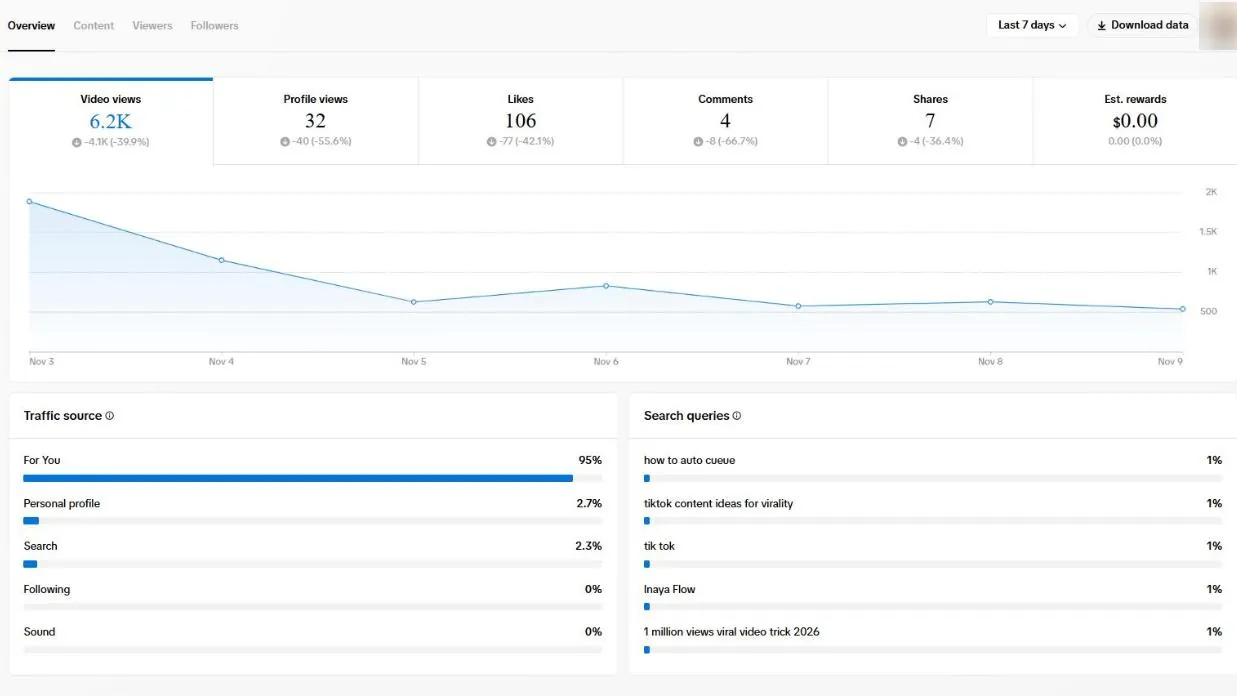
Here is the Studio overview where that menu sits, taken from one of our own accounts:
What each Account Check result means
Freedom251 describes the screen like this: a checkmark means no issue is shown for that item, and a warning sign means an issue needs review. It lists four kinds of result:
| Result | What you lose | Where you see it (per Freedom251) |
|---|---|---|
| Account ban | Access to the account | A banner when you log in |
| Feature restriction | A function such as posting, commenting, profile editing or direct messages | Account check |
| Account ineligible for recommendation | Your account and posts are less likely to be recommended | Inbox, or below your username on your profile |
| Post ineligible for For You | One post is kept out of the For You feed | That post's analytics or More insights |
TikTok's Newsroom page backs the second and third rows in general terms: an entire account can be made temporarily ineligible for recommendation in the For You feed, and its content and account become harder to find in search. It says creators whose accounts are restricted from the feed will be notified and can appeal. It gives no length of time.
Why a clear result is not always the end
Shortimize makes the point that Account check and the For You decision are separate. It lists six checks, in this order:
- The video's eligibility notice. Open the video's More insights and look for an "ineligible for For You feed" notice.
- Account recommendation status. Look at your profile and Inbox for an "ineligible for recommendation" banner.
- Account check. See whether posting, commenting or other features are limited.
- Age restriction. Look under the video's More insights for an "unavailable to some audiences" notice.
- Review status. Copy the video's share link and see if it says the content is under review.
- A baseline comparison. If nothing is flagged, compare recent posts with your typical performance and see whether other accounts in your niche dropped at the same time.
The third step is the one most people stop at. The other five are where a single post's problem tends to show. If the video is paused for a check rather than flagged, our guide to a TikTok video under review explains what that message means and how long creators report waiting.
Strikes and the Account status page
TikTok's Newsroom page describes the strike system in a few lines. A first violation of the Community Guidelines gets a warning strike, which does not count toward the account's strike tally. Later violations do count. Zero-tolerance violations, such as incitement to violence, are excluded from warnings, and the account is banned immediately. Creators are told which rule they broke and how to appeal if they think it was a mistake.
What that page does not say is any number: no strike count that leads to a ban, no number of violations that triggers a For You restriction. It says only that the restriction applies when a creator repeatedly posts content against its For You feed standards. If a page tells you "three strikes and you are out", it is not quoting TikTok on that page. Our guide to TikTok video under review links TikTok's enforcement page for the rules on expiry and deleted posts.
Checking a video before you post it
TikTok has tested a pre-post check. Engadget reported on 30 July 2025 that TikTok was testing "Content Check Lite", a desktop web tool in TikTok Studio that checks uploaded videos for For You eligibility and flags possible issues before you post. Only a small group of creators was in the test at the time. A broader version, checking content against all Community Guidelines with suggestions for fixing it, was described as early. If your Studio shows it, it can save you a bad surprise; if it does not, you are not missing a required step.
What to do if you find a restriction
The steps below combine TikTok's Newsroom with the more detailed pages.
- Read the notice in full. TikTok says you are told which rule you broke.
- Appeal from the notice or the affected post if you think it is wrong. The Newsroom says creators can appeal a For You restriction.
- Do not delete and repost the same video to get around it. A repost of the same content can repeat the flag, and our under-review guide covers why.
- Stop the behavior the notice names. DEV Community lists four common causes: guideline violations, spam or repetitive content, banned hashtags or audio and abnormal account behavior.
- Review the last one to two months of videos and remove anything that breaks the rules, per DEV Community.
- Pause for a short time. DEV Community suggests 48 to 72 hours without posting or heavy activity, then one or two videos a day. That is its advice, not TikTok's.
DEV Community puts typical recovery at 2 to 4 weeks depending on severity. TikTok gives no figure, so treat that as an estimate.
If every check is clear
If Account check is clean, there is no inbox notice and no post-level flag, the status is not your problem. Views are very uneven: in our viral study of 10,124 trending US videos, the 766 that passed 1M views (7.6%) took 66.8% of all views, so a quiet video is not proof of a restriction.
Use this short routine instead:
- Compare your last 10 videos with your own typical views. One weak week is noise.
- Open traffic sources in Studio and see whether the For You share changed. Our traffic sources guide explains each label.
- Change one thing at a time: the hook, the length or the posting time. Our shadowban guide has a ten-video test.
- Check whether third-party "shadowban checkers" are worth it. Our guide to whether shadowban checkers work says what they can and cannot see.
For the broader picture, why you are getting no views covers the content-side causes.
What you cannot check
Account Check is yours alone, so you cannot see another account's status. From the outside you can only see public numbers. A friend's low views do not tell you they are restricted, and a competitor's high views do not show their account is healthy. Third-party tools can compare public view counts against a baseline, which is a signal, not a verdict. TikTok does not use "shadowban" as a formal term, and no outside tool reads the same data as your own Account check.
Common mistakes
- Treating low views as a restriction. Check status first, then performance.
- Stopping at Account check. The For You decision for one post lives in that post's analytics.
- Quoting a strike limit. TikTok's announcement gives none.
- Deleting a flagged video to "clean up". Our under-review guide covers why that does not clear a strike.
- Trusting a recovery date. TikTok gives no length; the 2 to 4 weeks figure is one page's estimate.
How InayaFlow helps with this
Account status lives inside TikTok. InayaFlow cannot see your Account check, your strikes or your Inbox notices, and it does not read watch time or retention. What it can do is the performance half of the question, using only public data.
Type your handle into the free channel analysis. In about 30 seconds you get your profile stats, recent performance and how your best video compares with your typical one, plus your niche and the first strength and first area to improve. A free account shows the remaining findings. For a quick public-data check of your recent views against your usual median, the free shadowban checker does a view-count comparison only, never a ban verdict.
Both are quick and need no password. Pro adds Content Ideas, Write My Script and Video Analysis, which paste any video to see why it worked. InayaFlow never posts for you and does not promise views.
Bottom line
Check four places: Account check in TikTok Studio, the Account status page, your Inbox notices and the analytics of the video you are worried about. If something is flagged, read the notice and appeal if you disagree. If everything is clear, your account is fine and the work is in the content. To see how your recent videos compare, run the free channel analysis.
Frequently asked questions
Where do I find Account Check on TikTok?
Freedom251 gives this route: Profile, Menu, TikTok Studio, then Account check. A second route they list is Settings and privacy, Support, Safety Center, then Account check. TikTok's Newsroom announced the feature in April 2024. Labels vary by app version and region, so search the menu if yours differs.
What does Account Check show?
TikTok's Newsroom says it audits your account and your last 30 posts, showing whether you are in good standing and whether features like comments or direct messages are restricted. Freedom251 adds that a checkmark means no issue and a warning sign means something needs review.
Does a clear Account Check mean I am not shadowbanned?
It rules out an account ban and feature restrictions, but Shortimize says a single post can still be marked ineligible for the For You feed, and that shows in the video's own analytics. TikTok does not use the word shadowban. Check both places before deciding.
How long does a TikTok restriction last?
TikTok's announcement gives no duration for For You restrictions, and no strike threshold. DEV Community says recovery usually takes 2 to 4 weeks depending on severity, which is its estimate with no TikTok source.
Can I check someone else's TikTok account status?
No. Account Check is private to the account owner. For another creator you can only see public information such as followers and recent views, which is no sign of any restriction.
What if the app says my account is fine but my views are low?
Then treat it as a performance problem. Compare your last ten videos with your own typical views, look at traffic sources in Studio and test one change at a time. Our shadowban guide has a step-by-step version.
Sources
- TikTok Newsroom: Community Guidelines update (April 22, 2024)
- Shortimize: How to tell if TikTok is suppressing your video (November 24, 2026)
- Freedom251: TikTok account restricted: how to tell a suspension from recommendation ineligibility (November 24, 2026)
- DEV Community: TikTok shadowban check: how to tell if your account is restricted (November 24, 2026)
- Engadget: TikTok content check tells creators if their videos will be blocked from For You pages (July 30, 2025)