Published ·Updated ·By the InayaFlow team ·8 min read
TikTok Traffic Sources Explained (2026)
What each TikTok traffic source means, including Personal Profile and Other, what a healthy mix looks like and why no page defines Other.
TikTok's traffic source panel shows where viewers found your video: the For You feed, accounts you are followed by, your profile, a search, a sound page or a hashtag page. There is also an "Other" bucket, and none of the pages we read defines it. For most videos from small accounts, For You is the biggest slice, which is a good sign rather than a worry.
Try it on your own account: type your TikTok username for a free report on your recent videos.
Key takeaways
- Traffic sources show where viewers found a video: For You, Following, Personal profile, Search, Sound and Hashtag, plus an 'Other' bucket. Graphed, Metricool and Sprout Social all describe these in similar terms.
- None of the three pages we read defines 'Other', and we could not load a TikTok page that does. Treat it as everything TikTok does not name, which is an inference, not a TikTok definition.
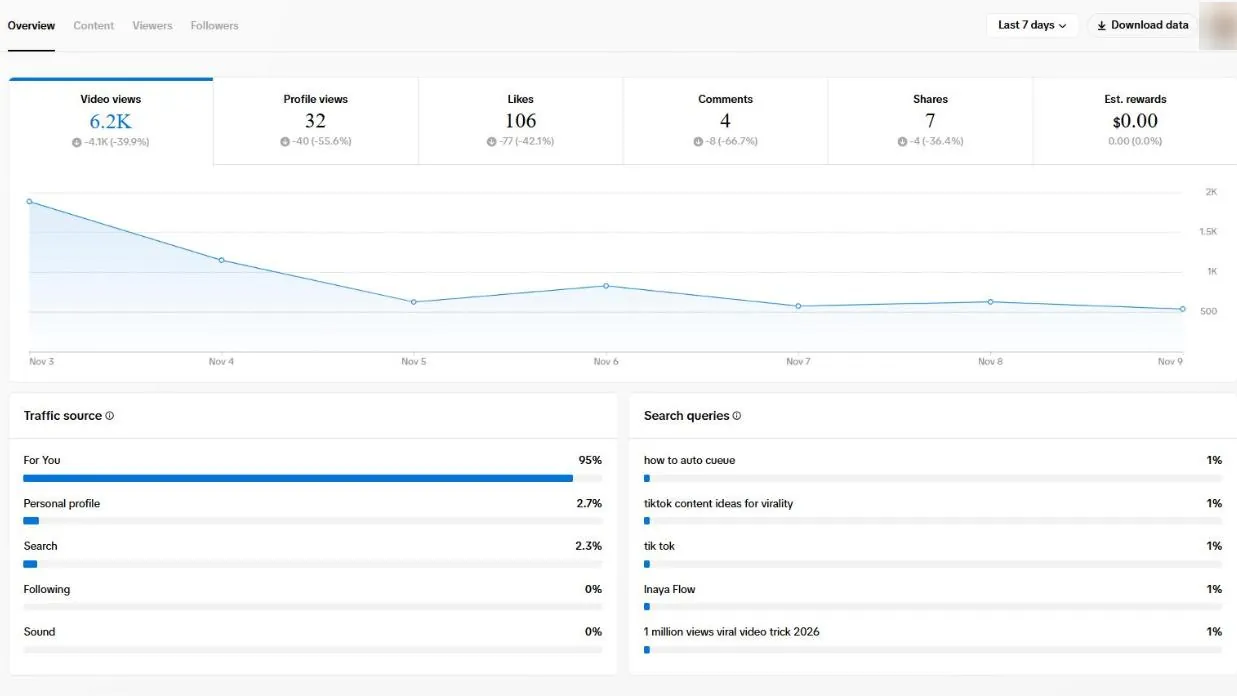
- On one of our own accounts (last 7 days), For You was 95% of traffic. A high For You share means TikTok's feed, not your followers, decided who saw the videos.
- Sprout Social says search traffic under 10% suggests missed discovery. That is a vendor rule of thumb, not a TikTok benchmark.
- Sprout Social says a qualified view needs at least 5 seconds of watching. For Creator Rewards, qualified views come from the For You feed (see our Creator Rewards guide), so traffic from other sources does not count toward pay.
On this page
This guide explains each source in plain terms, how to read the mix, what the pages that rank for this topic agree on and where they leave gaps, and a short routine to use the numbers. It is part of our analytics series next to how to read TikTok analytics.
TikTok traffic sources at a glance
| Source | What it means | Where the number comes from |
|---|---|---|
| For You | Viewers shown your video in the main recommended feed | The feed decided who saw it |
| Following | Viewers who opened the Following tab and saw you | Your existing followers |
| Personal profile | Viewers who opened your profile, then chose a video | Someone already curious about you |
| Search | Viewers who typed a query, then tapped your video | A viewer looking for the topic |
| Sound | Viewers who opened a sound page and picked your video | A viewer who liked the sound |
| Hashtag | Viewers who opened a hashtag's feed and found your video | A viewer browsing that topic |
| Other | Not defined by the pages we read | Unknown |
Where to find your traffic sources
In TikTok Studio, open Analytics. The Overview shows an account-wide traffic source panel, and each video's own analytics page shows that video's split. Menu labels have changed over time and differ between mobile and desktop, so look for the panel named "Traffic source". Graphed's walkthrough runs from the top-right menu to Creator Tools or Business Suite, then Analytics and the Content tab, and it says you need a Business or Creator account.
On this account over 7 days, For You made up 95% of traffic, with search queries listed beside it. Read that as the feed doing the work. A creator who sees 95% For You is being shown to people who do not follow them yet.
Sprout Social adds a few facts about how the Overview works: it covers the last 7, 28 or 60 days, and video views are measured hourly for the first 48 hours, then up to 7 days after posting. TikTok's own help page for this did not load for us, so check the ranges in your own app.
What each traffic source means
For You
Views from TikTok's recommended feed, where viewers scroll content the system predicts they will enjoy (Graphed, Metricool). TikTok's Newsroom says the feed is shaped by signals such as what you watch, like and share, and by video information such as hashtags and sounds (TikTok Newsroom). For small accounts, this is usually the largest source, because few people follow you yet.
What to do with it: treat a high For You share as evidence that your hook and early retention are working with strangers. If it is low, your views are coming from people who already know you, and growth will be slow. Our TikTok algorithm guide covers what TikTok says drives that feed.
Following
Views from people who opened the Following tab to see only accounts they follow (Graphed). Metricool describes it as impressions from the feed of users who follow the account.
What to do with it: this is your base. A video with a high Following share and low For You share is a video your audience liked but the feed did not push. If most of your views are here, you are posting for people you already have.
Personal profile
Views from users who visited your profile and then opened a specific video, often after discovering you elsewhere (Graphed). Metricool calls the same group "Profile".
What to do with it: this is a trailing signal. It rises after a video does well, because viewers check your page. If your Personal profile share is healthy but followers are not growing, check whether your profile makes clear what you post and why to follow. Our bio ideas guide covers that.
Search
Views that occur when someone types a query, finds your video in the results and taps it (Graphed). Metricool says these come from the Discover page when the video appears in search results. Graphed frames search as high-intent traffic and a source of views that can keep arriving for months, but it cites no data for that.
Sprout Social says search traffic under 10% suggests you are missing long-term discovery. That is its own rule of thumb with no TikTok benchmark behind it, so use it as a prompt to check your wording, not a target. To learn how TikTok search works, read TikTok SEO.
Sound
Views from people who liked a sound in another video, opened the sound page and chose your video from the list of videos using it (Graphed). If a lot of your views come from Sound, a sound you used was popular at the time.
Hashtag
Views from people who opened a hashtag's feed and found your video there (Graphed, which says it works like Sound but through a hashtag). Metricool reports Hashtag and Sound views in its post list, not in its impressions chart, which is a good reminder that tools split the same data differently.
Other
None of the three pages defines "Other". Graphed lists six categories and does not mention it. Metricool's definitions skip it. Sprout Social does not explain it. We could not load TikTok's own article. A fair reading is that it collects views from sources outside the named categories, but that is our inference, not a TikTok definition.
What to do with it: look at the size. A single-digit share is background noise. If a large share of a video's views sits in Other and you cannot explain it, do not guess: check that video's other numbers and wait a few days, since some splits update as data settles.
Qualified views and traffic sources
If you are in the Creator Rewards Program, source matters for pay. Sprout Social says a qualified view requires watching at least 5 seconds. The help pages we read for the program say qualified views come from the For You feed. That is why a video can have plenty of total views from Following, Profile or Sound and still count for little in the program. Our Creator Rewards guide sets out the full definition from TikTok's own pages.
A healthy mix: what to look for
TikTok publishes no ideal split, and the pages we read give none beyond Sprout Social's 10% search line. So judge by pattern:
| Pattern | Likely meaning | Next step |
|---|---|---|
| High For You, low Following | Strangers see you; your base is small | Make profile and bio clear to turn viewers into followers |
| High Following, low For You | Your base watches; the feed does not push | Test stronger hooks aimed at new viewers |
| Rising Personal profile after a hit | Viewers are checking your page | Pin your best videos and fix your bio |
| Near-zero Search | People are not finding you by topic | Say the topic in speech, text and caption |
| Large Other | Unclear | Compare across videos and wait |
A five-minute routine
- Open the account Overview and note the For You share and the date range.
- Open your three best videos from the last 28 days and write down each one's top source.
- Open your three weakest and do the same.
- Compare. If your best videos have a higher For You share, the feed rewards what those videos do; copy their opening.
- Write one change for the next three videos and log the sources again in two weeks.
Scale matters here: on a video with few views, a few dozen views from one source can swing a percentage. Compare several videos before you change anything.
How to grow the sources you want
You cannot set a source, but you can write for one. The advice below comes from Graphed's list and is unproven, so test it on a few videos and watch the split.
- To earn more Search views: Graphed suggests saying your keywords out loud, putting them in on-screen text and writing a descriptive caption. TikTok's search is covered in our TikTok SEO guide, which sets out what TikTok itself says.
- To earn more For You views: work on the opening, since the feed decides who sees a video. Our hooks guide covers openings.
- To earn more Profile views: make your profile say what you post and why to follow. Viewers check it after a video lands.
- To earn more Hashtag views: use tags that describe the video, since Graphed says people reach you by browsing a tag's feed. Our hashtag strategy guide covers what TikTok allows and what works.
- To earn more Sound views: if a sound is central to the video, say so in the caption. Graphed describes Sound views as viewers choosing your video from the sound page.
Change one thing per batch of three videos, so you can tell what moved the split.
Common mistakes
- Reading one video's split as your whole account. One viral video can pull the percentage up for weeks.
- Chasing a percentage. A split is a result of the video, not a dial you can turn.
- Ignoring the date range. A 7-day view and a 28-day view can tell different stories.
- Treating Other as a problem. Without a definition, it is a label to watch, not a diagnosis.
- Comparing against other creators. Their audience, niche and size differ from yours.
How InayaFlow helps with this
The traffic panel lives inside your TikTok account, so InayaFlow cannot read it, and it has no access to sources, watch time or qualified views either. What it can read is public: the views, likes, comments, shares and saves on your videos. That is enough to answer the question behind the panel, which is which of your videos stand out and why.
The free channel analysis takes your handle, reads the videos anyone can see and names your niche, one strength and the first thing to fix. Signing up free reveals more of the report. Pro has Video Analysis, where you drop in one video and see why it landed. Keep it beside your Studio numbers rather than instead of them. No result is promised, and posting is yours.
Bottom line
Traffic sources tell you who found a video and how. For You means strangers, Following means your base, Profile means curiosity, Search means intent, Sound and Hashtag mean browsing, and Other is a bucket nobody defines. Check the mix on your best and weakest videos once a month, change one thing and compare. If you want an outside read on which videos stand out, start with the free channel analysis.
Frequently asked questions
What does Personal Profile mean in TikTok traffic sources?
It counts views from people who visited your profile and then opened a video from it, according to the third-party guides we read. TikTok's own pages do not define it, so treat it as a trailing signal: it rises after a video does well and viewers check your page.
What does 'Other' mean in TikTok traffic sources?
We could not find a definition. Graphed, Metricool and Sprout Social do not define it, and TikTok's own article did not load for us. It most likely collects views that come from places TikTok does not name, but that is our inference. A small 'Other' share is normal; a large one is worth a closer look at the video's link or embed sources.
What is a good For You percentage on TikTok?
TikTok publishes no target. A high For You share means strangers are being shown your videos, which is what growth looks like. On one of our accounts it was 95% over 7 days. Compare against your own earlier videos rather than a number from a blog.
Where do I find traffic sources in TikTok analytics?
Open TikTok Studio on mobile or desktop, go to Analytics and open the Overview for the account-wide split, or open a single video's analytics for that video's split. Menu names change, so look for the section called Traffic source.
Is low search traffic bad?
Not by itself. Sprout Social says search traffic under 10% suggests missed discovery, which is a vendor rule of thumb. If your goal is to be found for a topic, add the topic in speech, on-screen text and the caption, then check whether the Search share grows over several videos.
Do hashtag views come from the hashtag feed?
Per Graphed, Hashtag views come from people who opened a hashtag's feed and found your video there. It is not the same as the For You feed, even when the hashtag is #fyp.
Can I change my traffic sources?
Not directly. You choose the video, caption, sound and hashtags, and TikTok decides where each video is shown. You can influence the mix by making videos that answer a question people search for, or that people share to their own profile.
Sources
- Graphed: What does Search mean on TikTok analytics? (December 21, 2025)
- Metricool: TikTok metrics (help center) (November 24, 2026)
- Sprout Social: What TikTok metrics you need to track for TikTok marketing in 2026 (November 24, 2026)
- TikTok Newsroom: How TikTok recommends videos #ForYou (June 18, 2020)
- InayaFlow: InayaFlow viral TikTok study 2026 (22,767 trending videos) (November 27, 2026)