Published ·By the InayaFlow team ·8 min read
How to Use TikTok Studio: Upload, Analytics and Comments Explained
TikTok Studio is TikTok's free hub for posting, comments and analytics. See who can use it, what each section does and a 20-minute weekly routine.
TikTok Studio is TikTok's free home base for creators: you upload and schedule posts, manage comments, read analytics and find ideas in one place, on desktop or in the app. It is for creators aged 18 or older, and it adds no secret analytics, so the real gain is a bigger screen and one place to work.
Try it on your own account: type your TikTok username for a free report on your recent videos.
Key takeaways
- TikTok Newsroom (24 May 2024): TikTok Studio is a creation and management platform for creators 18 or older. It replaces the Creator tools in the app and the Creator Center web app, and the full suite is at tiktok.com/tiktokstudio on desktop.
- Studio covers posting and editing, managing published and scheduled posts, comments, analytics, inspiration and Creator Academy lessons.
- Buffer and Metricool say the Overview covers 7, 28 or 60 days, or a custom range, and the Content view lists the top 9 fastest-growing videos from the past week.
- Buffer says the per-post analytics match the 'More insights' in the app and add no new data, so desktop is about comfort, not extra numbers.
- Sources conflict on who gets access: TikTok says creators 18 or older, Metricool says personal accounts do not have access. Check your own account.
On this page
If you already post from your phone, Studio can feel redundant. It is worth opening for two things: reading your numbers without squinting at a phone, and handling comments and scheduled posts in bulk. This guide covers who can use it, what each section does, how to upload, how to read analytics and a short weekly routine. The numbers themselves are explained in our TikTok analytics guide.
TikTok Studio at a glance
| Section | What it does | Source |
|---|---|---|
| Home | Account summary and latest comments | Metricool |
| Posts | Manage published and scheduled posts, change privacy | TikTok Newsroom |
| Upload | Upload, edit, caption, schedule | TikTok Newsroom, Hootsuite |
| Comments | Filter, search, reply, report | TikTok Newsroom |
| Analytics | Account and content performance, audience, monetization | TikTok Newsroom |
| Inspirations | Trending videos and creators | TikTok Newsroom |
| Creator Academy | Lessons inside the tool | TikTok Newsroom |
What TikTok Studio is
TikTok announced Studio on 24 May 2024 as "a new comprehensive creation and management platform." It lets creators upload, film, edit, post, manage and analyze their content, with tools such as auto captions, a photo editor and autocut, which TikTok calls free and easy to use. It replaces the Creator tools in the TikTok app and the Creator Center web app, and the full suite lives at tiktok.com/tiktokstudio in a desktop browser (TikTok Newsroom).
Studio also recommends monetization programs to join and shows personalized trending videos and creators, and it links to Creator Academy lessons inside the tool.
Who can use it
TikTok's launch post says Studio is available to creators who are 18 years or older. Metricool adds that it is free for TikTok Business and Creator accounts and says personal accounts do not have access. We cannot confirm the personal-account claim from a TikTok page, and it sits oddly with TikTok's wording, so treat it as a possible reason for a missing menu rather than a rule. The checks that cost nothing: update the app, open tiktok.com/tiktokstudio on a computer and confirm your age on the account.
How to open it
Buffer lists three ways to reach Studio: the Apple or Android app stores, tiktok.com/tiktokstudio in a desktop browser, or Profile then TikTok Studio inside the TikTok app. The desktop browser is the one TikTok calls the full suite. Hootsuite says you log in at tiktok.com with the same credentials you use on your phone.
Upload and schedule from your computer
Hootsuite says desktop uploads go through TikTok Studio: you add the video, then the caption, hashtags and a cover, and either publish or schedule. Desktop has no camera and lacks the in-app filters and effects, so record and edit first, then upload. Everything you need to schedule is in our guide to scheduling TikTok posts, and the cover step is covered in how to change your TikTok cover.
A few habits make uploads smoother:
- Finish the edit before you open Studio. Desktop is for posting, not shooting.
- Write the caption in a notes file first. Long captions are easier to fix on a keyboard.
- Choose the cover on purpose. It is the first frame many viewers see on your profile.
- Check privacy before you publish. Studio's Posts section lets you change it later, but a mistake can show for a while.
Manage comments
TikTok says you can filter and search comments, interact with your audience and report comments that may break the rules. Metricool says the Comments section lists the latest comments and lets you filter and search. Buffer covers replying from the same screen. Use it to answer the questions that repeat: each one is a video idea, and answering from Studio is faster than scrolling your phone.
Read your analytics
This is where Studio earns its place. Buffer and Metricool both say the Overview covers 7, 28 or 60 days, or a custom range, and that the Content view shows videos from the last 7 days plus the top 9 fastest-growing videos. TikTok's own 2020 analytics tutorial describes the same pattern: an overview of total views, followers and profile views, a content tab and a followers tab (TikTok Newsroom).
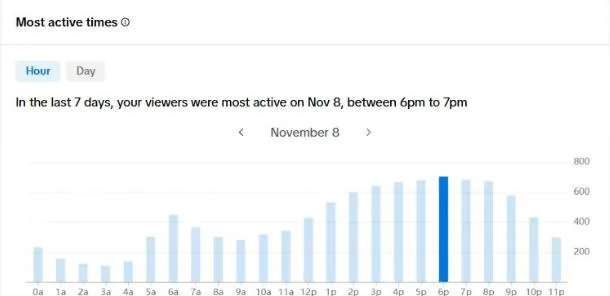
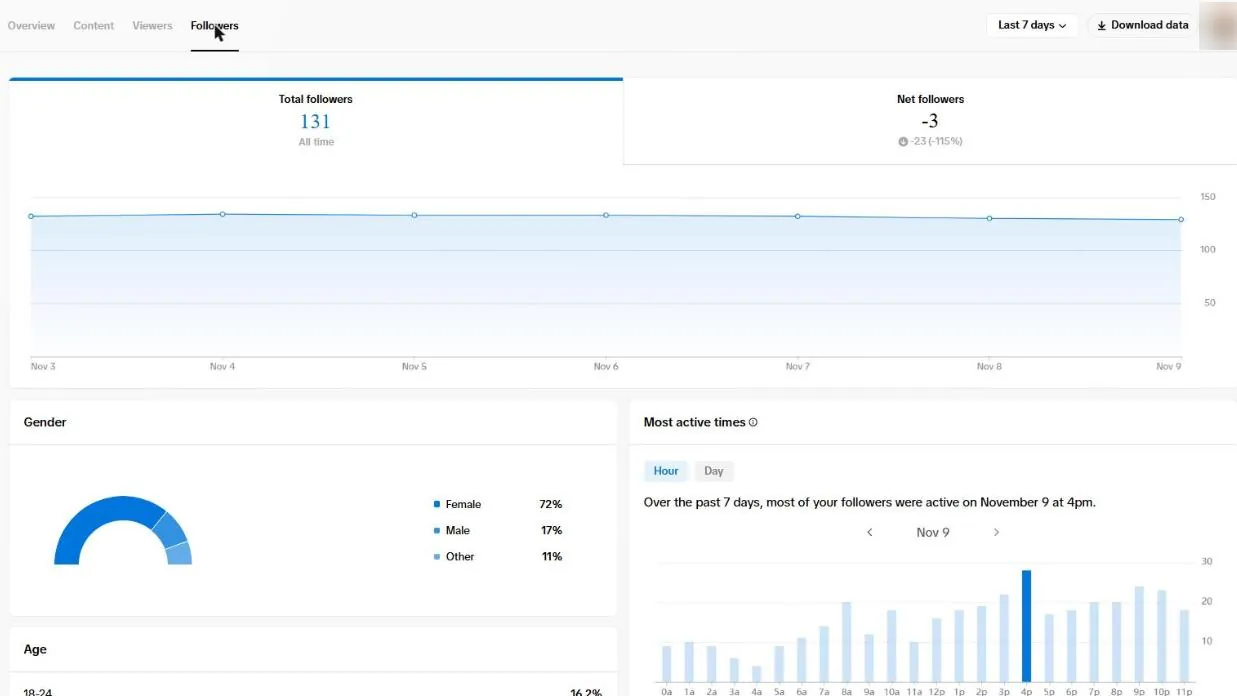
On our screens the Followers and Viewers tabs show a most-active-times chart by hour. Use it as a starting point for when to post, then test it. Our best time to post guide explains how.
Buffer makes one point worth repeating: the per-post analytics match what you see under More insights in the app, and Studio adds no new data. So do not expect hidden numbers on desktop. Expect the same numbers, laid out so you can compare videos.
To read the source split on the Overview, see our guide to TikTok traffic sources. For what any number means, start with TikTok analytics.
Inspiration, monetization and Creator Academy
TikTok says Studio recommends monetization programs and shows trending videos and creators for inspiration. Buffer lists program requirements it read in Studio in 2024: video gifts at 1,000 followers and 30 days active, the Creator Rewards Program at 10,000 followers and a video with over 100,000 views in the past 30 days, subscriptions at 1,000 followers and 30 minutes of LIVE, and the Creator Marketplace at over 10,000 followers and more than three videos in 30 days. Those are Buffer's 2024 figures. Our Creator Rewards guide uses TikTok's current pages, so check there before you rely on any number.
Metricool also lists a Feedback section where you can send TikTok comments with up to four screenshots. That is a useful route if something looks broken.
Studio on desktop or in the app
The two overlap, and the sources say different things about each:
| Task | Desktop (tiktok.com/tiktokstudio) | App |
|---|---|---|
| Upload and schedule | Yes; caption, hashtags, cover (Hootsuite) | Yes |
| Record with the camera | No; Upload button instead (Hootsuite) | Yes |
| Filters and effects | Not on desktop (Hootsuite) | Yes |
| Analytics | Full web analytics (TikTok) | Same per-post numbers under More insights (Buffer) |
| Bulk upload | TikTok describes Studio as offering "enhanced web analytics, bulk upload, and feedback" (quoted by Buffer) | Not stated |
| Comments | Filter and search (TikTok Newsroom) | Available |
A simple split works for most creators: film and edit on your phone, then use Studio on a computer for scheduling, comments and the weekly analytics read.
If Studio is missing or empty
- No Studio option: check you are 18 or older, update the app and try tiktok.com/tiktokstudio on a computer. Metricool says personal accounts have no access, which TikTok does not say, so if you are on a personal account and everything else checks out, the account type is the thing to look at.
- Missing analytics: TikTok's enforcement help page says you must turn on analytics in your TikTok settings to see decisions about your videos, such as a post made ineligible for recommendation (TikTok). If your charts are blank, check that setting first.
- A comment you cannot find: it may be filtered or removed. Studio is not a list of every comment ever left.
- Numbers that differ from the app: Buffer says the per-post analytics match the app, so a gap usually means a different date range. Set both to the same 7 or 28 days.
A 20-minute weekly routine
- Posts (3 minutes). Check scheduled posts for the week and fix captions.
- Comments (7 minutes). Reply to the top questions and write down any that could become videos.
- Analytics (7 minutes). Open the 28-day Overview, note views, followers and the traffic source mix, then open your best video of the week and write down why you think it worked.
- Inspiration (3 minutes). Look at one trending video in your niche. Note the structure, not the content.
Keep a short log: views, profile visits and the follower change for the week. Views are lopsided (in our viral study, the 766 videos over 1M views took 66.8% of all views), so write your own typical number down before judging a week.
Common mistakes with TikTok Studio
- Judging every post at a different age. Early numbers keep moving, so compare posts at the same age, such as 7 days after posting.
- Comparing different date ranges. Set the Overview to the same 28 days before you compare two periods.
- Treating the active-times chart as a rule. It shows when people were active, not when a post will perform. Test two or three windows.
- Ignoring comments. Each repeated question is a ready-made video idea.
- Reading the top-9 list as a ranking of quality. Buffer and Metricool describe it as the nine fastest-growing videos of the past week, which measures speed, not quality.
What Studio cannot do
- It cannot show who unfollowed you or who watched. TikTok's analytics describe aggregate numbers.
- It cannot replace a plan. Studio shows what happened, not what to post.
- It does not record or add filters on desktop. Hootsuite says to record in the app.
- It does not promise views. It is a tool for posting and reading numbers; no page we read says posting from desktop changes how a video is recommended.
How InayaFlow helps with this
Studio holds the private numbers for your own videos. InayaFlow works only with the public side. Hand the free channel analysis your handle and it reads the videos anyone can watch, then reports your niche, one strength and one place to improve first. It cannot see inside Studio, so traffic sources, watch time and qualified views stay out of reach.
Used together, Studio gives you the figures and the InayaFlow report, which a free account opens in full, gives you a pattern to hold them against. Pro brings Best Posting Times built from your own best videos, plus Content Ideas and Write My Script for what to film next. No outcome is promised, and the posting stays yours.
Bottom line
TikTok Studio is the place to post from a computer, answer comments and read analytics on a larger screen. It adds no new numbers, it is for creators 18 or older, and menu names change, so check what your own account shows. Set a 20-minute weekly routine and use it to decide your next three videos. If you want a view from outside Studio, the free channel analysis is the quickest start.
Frequently asked questions
Is TikTok Studio free?
TikTok describes the tools in Studio as free and easy to use. Metricool also calls it free for business and creator accounts. TikTok's launch post says Studio is for creators 18 or older.
Where do I find TikTok Studio?
Buffer lists three routes: the app stores, tiktok.com/tiktokstudio in a desktop browser, or Profile then TikTok Studio inside the TikTok app. TikTok says the full suite is on desktop.
Does TikTok Studio show more analytics than the app?
Buffer says the per-post analytics match what the app shows under More insights and that Studio adds no new data. Studio is mainly a bigger screen and a place to manage posts, comments and analytics together.
Can I upload to TikTok from my computer?
Yes. Hootsuite says desktop uploads go through TikTok Studio, where you add the caption, hashtags and cover, then publish or schedule. Desktop has no camera recording or effects.
How far back do TikTok Studio analytics go?
Buffer and Metricool say the Overview covers 7, 28 or 60 days, or a custom range. We could not read a TikTok page stating the limit, so check the picker in your account.
Why can't I see TikTok Studio on my account?
TikTok says Studio is available to creators 18 or older. Metricool says personal accounts have no access. If it is missing, update the app, try the desktop site and check your age and account type.
Sources
- TikTok Newsroom: Helping creators bring creativity to life with TikTok Studio (May 24, 2024)
- Buffer: How to use TikTok Studio (July 1, 2024)
- Metricool: TikTok Studio: a management platform for creators (November 24, 2026)
- TikTok: Content violations and bans (November 24, 2026)
- Hootsuite: TikTok desktop: how to use and post TikToks from your computer (July 25, 2025)
- TikTok Newsroom: Product tutorial: TikTok Analytics (August 14, 2020)
- InayaFlow: InayaFlow viral TikTok study 2026 (22,767 trending videos) (November 27, 2026)