Published ·By the InayaFlow team ·10 min read
TikTok Follower Count History: How to See It and Keep It
TikTok shows follower growth in Studio, but not a full history for any account. See where to find yours, how to keep your own log, and what tools can add.
You can see your own follower history in the Followers tab of TikTok Studio, but TikTok does not give you a long, permanent record, and it gives you no history at all for other people's accounts. The reliable fix is to log your count once a week, and to use a tracker only if you need history for accounts that are not yours.
Try it on your own account: type a TikTok username to see its followers, likes and videos right now.
Open the full TikTok follower count checker.
Key takeaways
- TikTok Newsroom (2020): the Followers tab in TikTok Studio analytics shows follower count over time and growth trends for your own account.
- No TikTok page we could read gives a history of another account's followers. Public lookups show today's number only, so history for someone else has to be recorded from the day you start.
- Vendors disagree on how far back TikTok's own history goes (one says about a year, none cites TikTok), so export or log your numbers instead of relying on it.
- Metricool 2026 study, 2,314,756 posts and 92,000+ accounts: 16.47% of TikTok accounts moved up a follower tier, and only 3.34% of accounts past 100K reached 1M or more.
- A weekly log takes about two minutes and gives you a history no tool can take away.
On this page
This guide shows where your numbers live, how to keep your own history in two minutes a week, how to look up any public account today, what paid trackers add, and how to read a spike, a drop and a plateau once you have the data. It is part of our followers and analytics series; if you are mainly trying to grow, start with how to get more followers on TikTok.
Follower count history: your options at a glance
| Method | Whose account | History | Cost | Best for |
|---|---|---|---|---|
| Followers tab in TikTok Studio | Yours | Limited range on screen | Free | A quick look at recent growth |
| Your own weekly log | Yours or anyone's | As long as you keep it | Free | A permanent record |
| Public profile check | Any public account | Today's number only | Free | Checking a creator before a deal |
| Free follower count checker | Any public account | Today's number only | Free | Fast lookups with a timestamp |
| Third-party tracker | Yours, sometimes others | From the day it starts, up to years | Paid or trial | Agencies, many accounts, reports |
Where TikTok shows your own follower history
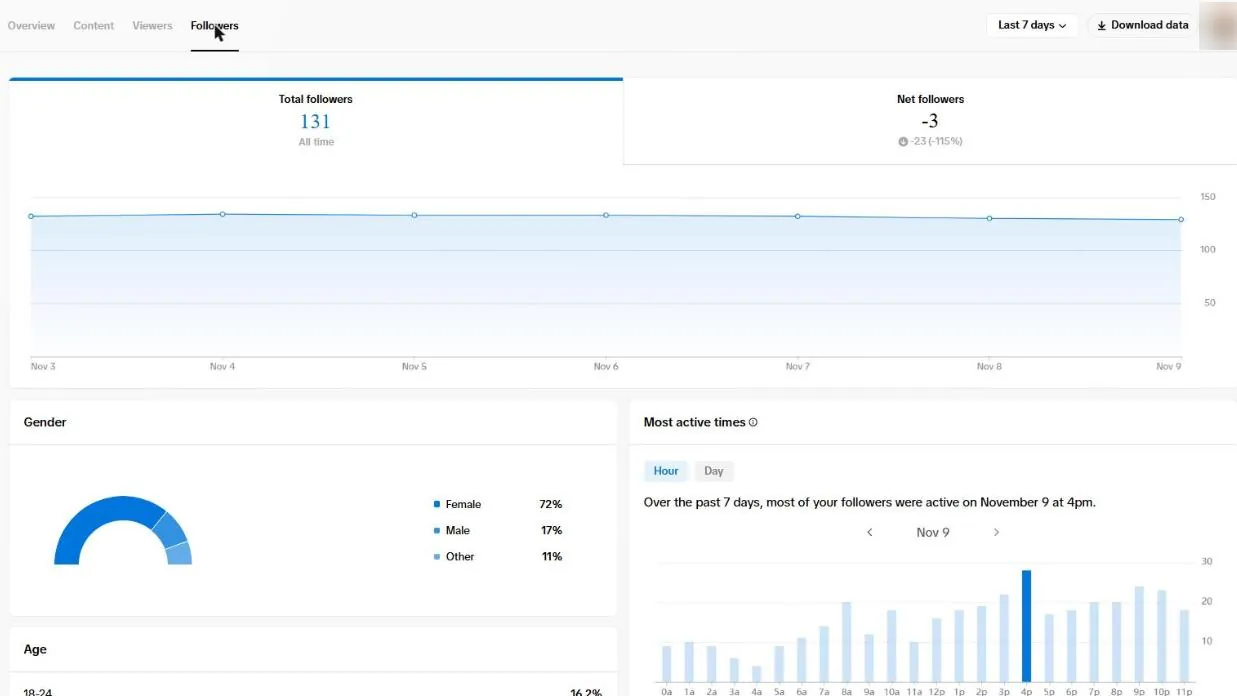
In the app, go from your profile to the menu, then TikTok Studio, then Analytics. TikTok's Newsroom tutorial describes the Followers tab as your count across time plus growth trends (TikTok Newsroom). That tutorial is from 2020, and TikTok Studio has changed since. The screen below is from one of our own accounts in November 2026.
What the screen gives you:
- Total followers over time. The line shows whether you are growing, flat or shrinking.
- Net followers. New followers minus people who left, which is the number that matters.
- Who your followers are. Gender split and most active times, useful for deciding when to post.
What it does not give you is a permanent archive. On our screens the default view is a short recent window. How far back you can scroll differs by account and by app version, and no TikTok page we were able to load states the limit. Socialinsider says follower data is not available beyond one year, and gives no source for it (Socialinsider). Treat that as a reasonable guess, not a promise.
For a deeper tour of the other tabs, see our guide to reading TikTok analytics.
The free history that never expires: a weekly log
Whatever the limit is, you can beat it by writing your own number down. Both Socialinsider and NapoleonCat make the same point from different sides. Socialinsider lists manual tracking in a sheet as a free method that "requires consistent effort". NapoleonCat says its history starts only when an account is connected, because TikTok does not give earlier numbers. In other words: nobody can hand you last year's count afterward. Start recording today.
The log, step by step
- Pick one day and time, for example Sunday evening.
- Open the Followers tab, read the total and write it down.
- Subtract last week's total to get the weekly change.
- Add one line saying what you posted and anything unusual.
- Every month, add a column with the month's change.
A template you can copy
| Date | Total followers | Change since last week | Videos posted | Notes |
|---|---|---|---|---|
| Sun 1 Nov | 1,240 | 3 | Started a series | |
| Sun 8 Nov | 1,310 | +70 | 4 | Series part 3 got shared |
| Sun 15 Nov | 1,295 | -15 | 2 | Skipped two days |
| Sun 22 Nov | 1,340 | +45 | 4 | Back to normal pace |
These numbers are an example of the layout, not real data. The notes column is the most useful one: three months from now it is what lets you work out why a number moved.
How to look up any public account today
Sometimes you want a number for an account that is not yours: a creator you may work with, a competitor, a friend. TikTok's public profile shows followers, following and likes, and anyone can open it in a browser. There are free checkers that do the same lookup faster. Our free TikTok follower count checker shows followers, following, likes and video count from the public profile, with the time it was read. It needs no password and no TikTok login. A "Show my video stats" button adds median views, engagement rate and posts a week from the recent public videos.
Be clear about what this gives you: one number, today. It is a snapshot. If you want to build a history of someone else's account, record the number yourself on a schedule, with the same log above. Run it the same day each week and you will have a record in two months that no public page shows.
A few cautions when you compare numbers across tools:
- A tool shows the count at the time it read the profile. Note the timestamp.
- The number in the app and the number in a tool may differ slightly if one was read earlier.
- Never give a checker your TikTok password. A tool that needs only a public @username is the safe kind.
What third-party follower trackers add
Trackers record the count every day, keep it for you and draw a chart. We opened three pages that rank for this search and wrote down what each claims. These are the vendors' own statements, and we did not test the tools.
| Tool | What its page says | Cost it shows |
|---|---|---|
| NapoleonCat | Daily follower counts kept up to 24 months; recording starts when the account is connected; no TikTok competitor tracking | From $79 a month for 2 users and 5 profiles; 14-day trial |
| Socialinsider | Estimated history for dates before you connected an account; competitor tracking and benchmarks | 14-day free trial |
| Metricool | Follower growth, audience activity and reports; also lists Social Blade as a tracker for public accounts | No price on that page |
Two things in that table are worth noticing. First, "estimated" history from Socialinsider is a modeled number, not a TikTok record, and the page itself says exact earlier counts cannot be retrieved. Second, the page from NapoleonCat says TikTok competitor tracking is not possible, which tells you how limited the data is for accounts that are not yours.
For a single personal account we would not pay. Studio plus a weekly log covers it. Trackers earn their price for agencies and brands with many accounts that need reports. If you are weighing tools, a checklist for picking one is in how to choose a TikTok analytics tool.
How to read your follower history
Once you have a few weeks of numbers, look for the shape.
Spikes
A jump of far more than a normal week usually has one cause: one video. Open the Content tab and sort by posting date around the spike. Note what the video did differently, such as its topic, its first seconds and its length, then check whether your next videos in that style repeat the gain. Follow the viral TikTok teardown.
Drops
A small weekly dip is normal. Followers leave, and TikTok can remove accounts. A big one-day drop is worth a look at two things: what you posted in the days before, and whether your posting pace changed. Do not jump to a conclusion about restrictions; TikTok says it tells you about those. See the TikTok shadowban check.
Plateaus
Flat lines happen to nearly everyone. Metricool's 2026 TikTok study (2,314,756 posts from over 92,000 accounts, per its page) found that 16.47% of TikTok accounts moved up a follower tier in the period, and that only 3.34% of accounts past 100K followers reached 1M or more (Metricool). Read those two numbers as context: moving up a tier is something about one in six accounts did, and the top steps are rare. A plateau is not a sign you are failing.
Match growth to views, not to hopes
Follower growth follows views, and views are lopsided: in our viral study of 10,124 trending US videos, the 766 videos over 1M views took 66.8% of all views. If your views are modest, a gain of a few dozen followers a week is ordinary. Compare your log with your own earlier weeks, not with someone with a million followers.
How to turn the log into a growth rate
A raw change of +45 means little without a base. Convert it to a percentage so weeks and accounts can be compared on the same scale.
Weekly growth rate = (this week's total minus last week's total) divided by last week's total, times 100.
Using the example log above:
| Week | Total | Change | Growth rate |
|---|---|---|---|
| 8 Nov | 1,310 | +70 | 70 / 1,240 = 5.6% |
| 15 Nov | 1,295 | -15 | -15 / 1,310 = -1.1% |
| 22 Nov | 1,340 | +45 | 45 / 1,295 = 3.5% |
Over those three weeks the account went from 1,240 to 1,340, which is 100 followers or 8.1%. Those are made-up example numbers to show the arithmetic. Two habits make the percentage useful:
- Use a four-week average. One week is noisy. Add four weekly changes, divide by four, and watch that line.
- Compare with yourself first. If your four-week average is rising, your recent changes are working, whatever other accounts do.
Checking another creator before you work with them
A follower number alone says little. If you are deciding whether to partner with a creator, a short check is better than a glance at the total:
- Look up the account with a follower count checker and note the time it was read.
- Ask the creator for a screenshot of their own Followers tab covering the last month. They can see it and you cannot.
- Compare followers with typical views from the last ten videos. A very large gap deserves a question.
- Look at the comments for real conversation rather than repeated phrases.
- Check again a week later. A sudden jump with no matching video is worth asking about.
None of this proves anything on its own, and you should never accuse someone from a number. It simply gives you better questions.
Follower count versus the numbers that matter more
A follower total tells you how many people chose to follow. It does not tell you how many see your videos. Views, engagement rate and the share of views that came from non-followers say more about how your content is doing. Pair your follower log with a second column for your average views over the last ten videos and, if you want a third, your engagement rate; our guide to a good engagement rate on TikTok explains how to work it out.
Why numbers differ between places
If your count in the app, in Studio and in a tool do not match exactly, check these in order:
- When each number was read. A cached number can be minutes or hours old.
- Which account. A business and a personal account can have different handles.
- What is counted. Net followers and total followers are different lines.
- Rounding. Some displays round large numbers.
If the difference stays large for days, restart the app, update it, and check your own log for the last known good number.
What not to do
- Do not buy followers to improve your chart. It adds a number and no viewers.
- Do not give a tracker your TikTok password.
- Do not compare your weekly change with accounts ten times larger.
- Do not stop logging after a bad week. The log is most valuable in the flat stretches.
How InayaFlow helps with this
InayaFlow does not keep a daily follower history, and we would rather say so than imply it. What the free analysis does is read your public profile and recent videos and show you what the numbers behind your followers look like: your totals, how recent videos performed, your best versus typical video and your niche. Type your handle into the free TikTok channel analysis, no password, and the first results arrive in about 30 seconds. Signing up free (no card) opens the remaining sections of the report.
Use it next to your weekly log: the log tells you when followers moved, and the analysis helps you see which of your videos looks like the reason. Its inputs are public engagement counts. It cannot see how long people watched, and it makes no growth promises. You do the posting.
Bottom line
Your history is only as long as the numbers you keep. Use the Followers tab for the recent picture, write down your total each week, and use a free lookup when you need today's number for someone else. Reach for a paid tracker only when you manage several accounts. If you want a quick snapshot now, type any @username into the free TikTok follower count checker.
Frequently asked questions
Can you see your follower count history on TikTok?
Yes, for your own account. TikTok's Newsroom tutorial says the Followers tab in analytics shows follower count over time and growth trends. The range you can pick on screen is limited, and we could not read a TikTok page that states how far back it goes, so keep your own log as well.
Can you see another account's follower history on TikTok?
Not inside TikTok. A public profile shows today's number. Third-party trackers build a history by recording the number every day from the day you add the account, and NapoleonCat's page says it cannot show numbers from before an account was connected.
How do I check a follower count without logging in?
Open the public profile in a browser, or type the @username into a free checker. InayaFlow's follower count checker shows followers, following, likes and video count from the public profile, with the time it was read, and needs no account for the first three usernames in 24 hours.
Why did my follower count drop?
Common reasons are people unfollowing, accounts being removed, or a normal dip after a spike. Check the date of the drop in your Followers tab or your log, then compare it with what you posted around then before drawing a conclusion.
How often should I record my follower count?
Once a week is enough for most creators, at the same time and day. Daily is useful only if you are testing a change and want to see its effect quickly.
Is a paid follower tracker worth it?
For one personal account, usually not: TikTok Studio plus a weekly log covers it. Paid trackers make sense for agencies and brands that need many accounts, long history in one place and reports. Prices on the pages we read start around $79 a month.
Sources
- TikTok Newsroom: Product tutorial: TikTok Analytics (August 14, 2020)
- Socialinsider: How to check your TikTok follower count history (November 24, 2026)
- NapoleonCat: TikTok follower count history (November 24, 2026)
- Metricool: How to track and gain TikTok followers (2026 TikTok Study) (November 24, 2026)
- InayaFlow: InayaFlow viral TikTok study 2026 (22,767 trending videos) (November 27, 2026)