Published ·By the InayaFlow team ·10 min read
TikTok Personal vs Creator vs Business Account: What Actually Differs in 2026
Is a TikTok creator account the same as a personal one? See what Personal and Business accounts can and can't do, and which one fits you.
For most individual creators, "personal" and "creator" are the same TikTok account, and the real choice is Personal or Business. A Personal account keeps the full sound library, can be private and can join creator programs. A Business account adds ads, a shop and third-party tools but trims music and monetization. If you are not a brand, stay on Personal.
Try it on your own account: type your TikTok username for a free report on your recent videos.
Key takeaways
- Sprout Social, Brandwatch and HubSpot all say there are now two choices in practice: a Personal account (also called Creator) and a Business account. Sprout and Brandwatch date the merge of the old Creator type into Personal to 2021.
- TikTok's own entitlements page uses different names: General TikTok Account, Account with Advanced Access and Verified Business Account.
- The three pages agree on the big trade-off: Business accounts get a commercial music library and cannot go private; Personal accounts get the full sound library and can be private.
- Brandwatch says Creator accounts can join the Creator Fund (10,000 followers and 100,000 recent views); Business accounts cannot. That rule is out of date for today's Creator Rewards Program, so check the current one.
- Switching is possible in settings, but the pages warn it can change your analytics and features, so decide before you build an audience.
On this page
That is the short answer, but it needs some care. The names have changed over the years, three different pages describe the same two accounts in slightly different ways, and TikTok's own help pages use another set of names again. This guide lines them up, shows what each account can and cannot do in one table and gives you a simple way to decide. It belongs to our followers series, because several of the limits (the bio link, the monetization rules) depend on follower counts. The main page for that series is how many followers you need on TikTok.
Personal, creator and business: the names explained
If you have read three guides on this topic, you have probably seen three sets of names. Here is how they fit together.
| Name you will see | What it means | Where it comes from |
|---|---|---|
| Personal account | The default account every new profile starts as | Sprout Social, Brandwatch, HubSpot |
| Creator account | Same as Personal; the old separate Creator type was merged into it | Sprout (August 2021), Brandwatch (late 2021) |
| Business account | Account for brands: ads, shop, commercial music | Sprout Social, Brandwatch, HubSpot |
| General TikTok Account | TikTok's name for the standard account everyone begins with | TikTok account entitlements page |
| TikTok Account with Advanced Access | An account linked to a TikTok for Business account or an unverified Business Center | TikTok account entitlements page |
| Verified Business Account | An account that passed business verification | TikTok account entitlements page |
So when a guide says "creator vs business", it usually means "default account vs Business account". HubSpot says it directly in its title and headings: Personal, "aka Creator". Sprout Social dates the change to August 2021, linking an Adweek report as its source. Brandwatch says TikTok's "Pro" creator accounts were merged into personal accounts in late 2021. The two dates differ by a few months, which is a small mismatch between pages, not something we can settle. What matters is the result: there is no separate "creator" account to switch to now.
What TikTok's own page says
TikTok's account entitlements help page is written for advertisers and business tools, not for creators, but it is the only TikTok page we could read on account levels. It describes three levels (TikTok Ads Help Center):
- General TikTok Account: "the standard account everyone begins with." It has native TikTok features but no Business Suite access. Business information (address, phone, email) and a bio link cannot be displayed on it, and analytics are not available through Business Suite.
- TikTok Account with Advanced Access: granted by linking to a TikTok for Business account or an unverified Business Center. You can edit a bio link and business information, but they cannot display on the profile. It has basic analytics.
- Verified Business Account: granted after business verification. It adds public display of the business profile and conversion analytics.
Two cautions. The page's table was garbled in the copy we could read, so we matched cells to levels as carefully as we could. And it says nothing about music, privacy or monetization, so those differences come from the three guides below, not from TikTok.
Personal vs Business: what the top pages say
We read the three top-ranking pages for this search side by side on 24 Nov 2026.
- Sprout Social (about 1,100 words, first published August 2022): Business accounts get a commercially licensed library of over one million songs and sounds and can add a website link immediately. Personal accounts get the full audio library, can stitch and duet any video and need 1,000 followers for the link. Business accounts can be managed in third-party tools; Personal accounts cannot.
- Brandwatch (about 2,300 words, May 2025): adds that Business accounts are public by default and cannot be private, can message followers and in some cases non-followers, and get Ads Manager, the TikTok Pixel and TikTok Shop access. It says Creator accounts get basic insights and only message mutual followers.
- HubSpot (about 2,100 words, updated January 2025): says Personal accounts can earn through tips, LIVE gifts, the Creator Fund or Creativity Program Beta and Series, while Business accounts have no way to monetize content directly. Business accounts can run their own shop; Personal accounts can only earn as affiliates.
These pages are marketing blogs, not TikTok. Sprout gives no TikTok link for the music library size or the 1,000-follower number, and HubSpot's tip limit (up to $100) is its own claim. We use them for the shape of the differences, not as exact figures.
TikTok account types side by side
Here is the comparison, with the source for each row.
| Feature | Personal (Creator) | Business | Source |
|---|---|---|---|
| Music | Full sound library | Commercial library only (Sprout: over 1 million sounds) | Sprout, Brandwatch, HubSpot |
| Private account | Can be public or private | Always public | Brandwatch, HubSpot |
| Website link in bio | Needs 1,000 followers | Available straight away | Sprout, Brandwatch, HubSpot |
| Stitch and duet | Any public video | May be blocked when the original uses non-commercial audio | Sprout, Brandwatch |
| Analytics | Basic; Sprout says at least one public video is needed | Deeper analytics, including reach and demographics | Sprout, Brandwatch, HubSpot |
| Direct messages | Mutual followers only | Can message followers; in some cases non-followers | Brandwatch, HubSpot |
| Creator monetization | Eligible for creator programs | Not eligible | Brandwatch, HubSpot |
| Ads Manager, Pixel, Business Center | Not available | Available | Brandwatch, HubSpot |
| Third-party scheduling tools | Not supported (Sprout) | Supported | Sprout, HubSpot |
| TikTok Shop | Affiliate earnings only | Can run a shop | HubSpot |
Read the table with the age of the pages in mind. TikTok has changed its creator programs since some of them were written, so check the rule in your own settings before you rely on it.
Music: the difference creators notice first
The most-repeated difference is sound. Business accounts are limited to a commercial library of licensed tracks, while Personal accounts can use the full library, including trending sounds. HubSpot and Brandwatch both describe the Business library as royalty-free or commercially cleared.
If your content uses trending audio, a Business account is a poor fit. For the creator side of that choice, see original audio vs trending sounds on TikTok, which looks at when each kind of sound helps. We did not find a TikTok statement on exactly which sounds Business accounts lose, so the pages' general description is as far as we can go.
Privacy and who can see you
Brandwatch and HubSpot agree that Business accounts cannot be set to private. Every Business account is visible to anyone on TikTok. A Personal account can be public or private.
That sounds minor until you think about when you need it. If you are testing ideas on a new account, or you want to approve who follows you, you need a Personal account. If you want every possible viewer to be able to see your page, Business is public by design.
Analytics: both get them, with different depth
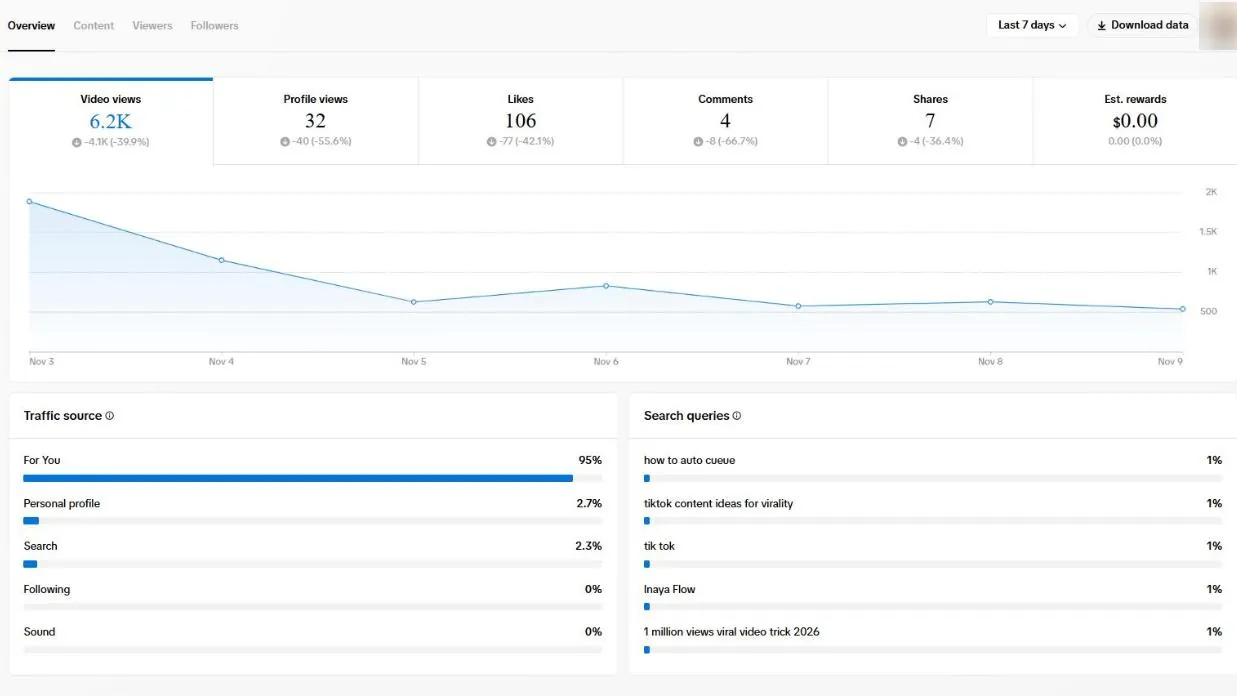
Sprout says Personal accounts see analytics once they have at least one public video. HubSpot and Brandwatch say Business accounts get deeper numbers, including reach and audience details. If you want to read your own Studio numbers in detail, our guide to TikTok analytics walks through each tab.
A Personal account's Studio analytics are enough for most creators. Here is our own account's overview for a week:
TikTok's entitlements page makes a point worth knowing: a General TikTok Account does not get analytics "via Business Suite". That refers to a business tool, not to the Studio screen above, so the two statements do not conflict.
Bio link, DMs and tools
The clickable bio link is one of the clearest dividing lines. Three guides say a Personal account needs 1,000 followers and a Business account does not. Our guide to TikTok link in bio requirements shows where those pages disagree on what "business" needs and what to do if you do not qualify.
For messaging, Brandwatch and HubSpot say Business accounts have wider reach than Personal accounts, which are limited to mutual followers. For tools, Sprout and HubSpot say Business accounts can be managed in outside software, including schedulers, while Personal accounts cannot. If you schedule through a third-party tool, you may be forced onto Business. Our guide to scheduling TikTok posts covers the options.
Money: the biggest practical gap
HubSpot lists these earning routes for Personal accounts: tips, LIVE gifts, a creator fund or program, and Series. Brandwatch says Creator accounts are eligible for the Creator Fund, which it describes as needing at least 10,000 followers and 100,000 recent views, and that Business accounts are not. Those thresholds belong to the older Creator Fund. The program that replaced it has its own rules, covered in the TikTok Creator Rewards Program guide, so do not use the Brandwatch figures as today's limits.
The pattern still holds: creator programs sit with Personal accounts, and Business accounts earn through ads, a shop or sales of their own. If you want to be paid by TikTok for views, you need a Personal account.
Which account should you choose?
Use this short test. Answer in order and stop at the first yes.
- Do you need to run ads in Ads Manager, install the Pixel or use a Business Center? Business.
- Do you sell your own products through TikTok Shop? Business, per HubSpot.
- Do you need a third-party tool to post for a team? Business, per Sprout.
- Do you want to use trending sounds, go private or join creator programs? Personal.
- None of the above? Personal. You can still earn as an affiliate, per HubSpot.
If you are a creator trying to grow, the answer is almost always Personal. The pages we read agree on that rule of thumb: individuals and creators stay on Personal, businesses use Business.
Switching accounts: what to know first
All three pages say you can switch in settings. Sprout says doing so may affect your analytics and access to features, and Brandwatch advises against switching back and forth. A few practical rules follow:
- Decide before you build. If you plan to be a creator, start as Personal.
- Write down your numbers first. Save your Studio analytics and note your follower count before a switch, so you can compare afterwards. Our follower count history guide has a simple log template.
- Do not use a switch as a test. If it changes access to music or analytics, you cannot undo what you have missed in the meantime.
- Check your bio link afterwards. If you switch to Business to unlock the link, confirm in Edit profile that it shows.
We have not switched a test account, so we cannot say what happens to your reach or past analytics. No page we read has data on that.
Common mistakes
- Switching to Business to "get analytics". Personal accounts get analytics too, per Sprout.
- Switching to Business for the bio link, then losing trending sounds. Check the music trade-off first.
- Using an outdated rule. Several limits quoted online (10,000 followers, 100,000 views) come from the old fund.
- Assuming a Business account gives more reach. No page we read shows a reach advantage; it gives tools, not distribution.
- Treating one blog's number as TikTok's number. The 1,000-follower figure and the library size come from guides, not from a TikTok page we could read.
How InayaFlow helps with this
The account type decides what tools you can use. It does not decide what to post. InayaFlow works on the public side of any TikTok handle, whether the account is Personal or Business, and it never posts for you.
Type your handle into the free channel analysis. In about 30 seconds you get your profile stats, recent performance, how your best video compares with your typical one, your niche and the first strength and first area to improve. A free account unlocks the remaining findings. Pro adds Content Ideas, Write My Script, Hashtags and Best Posting Times for the daily work of choosing what to film.
It is a quick daily check, not a switch. If you are weighing an account change, run the analysis first to see which videos are working, then decide on the settings. InayaFlow makes no promise about views or followers; the posting stays with you.
Bottom line
"Creator" and "Personal" are the same account today. Stay on Personal unless you need ads, a shop or third-party tools, and check the bio link, music and monetization rules in your own app, because the guides are older than TikTok's last changes. To see how your channel is doing before you change anything, run the free channel analysis.
Frequently asked questions
Is a TikTok creator account the same as a personal account?
Yes, in practice. Sprout Social says TikTok converted all creator accounts to personal accounts in August 2021, and Brandwatch says the old Pro creator accounts were merged into personal accounts in late 2021. Today most guides use Personal and Creator to mean the same default account.
Should I use a business account to grow on TikTok?
Not if you are an individual creator. The three pages we read say individuals and creators generally stay on Personal, because Personal keeps the full music library and the creator monetization programs. A Business account makes sense for a brand that needs ads, a shop or third-party tools.
Can I switch from a business account back to personal?
The pages say you can switch in settings. Brandwatch advises against switching often, and Sprout says it may affect your analytics and access to features, so treat the switch as a decision, not a test.
Which account type gets TikTok analytics?
Both. Sprout Social says a Personal account needs at least one public video to see analytics, and HubSpot and Brandwatch say Business accounts get deeper analytics with demographics and reach. TikTok's own entitlements page says a General TikTok Account does not get analytics through Business Suite.
Can a personal account add a link in its bio?
Three guides say a Personal account needs 1,000 followers for the clickable link, while a Business account can add one straight away. We cover where those pages disagree in our link in bio guide.
Can a business account earn from Creator Rewards?
Brandwatch and HubSpot say Business accounts cannot join TikTok's creator monetization programs; they earn through ads or their own shop. Those pages predate some program changes, so confirm in your own app.
Sources
- TikTok Ads Help Center: About TikTok account entitlements (November 24, 2026)
- Sprout Social: TikTok Business vs. Creator account: What's the difference? (August 9, 2022)
- Brandwatch: TikTok Business vs Creator Account: Which is Best for You in 2025? (May 30, 2025)
- HubSpot: TikTok Business vs. Personal: How to Make the Right Choice (January 30, 2025)