Published ·By the InayaFlow team ·8 min read
TikTok Profile Views Explained: Who Viewed Your Profile and How to Turn It On
How TikTok profile views work: who can see their viewers, the 16+ and under-5,000-follower rule, the 30-day window, how to switch it on and what it can't show.
You can see who viewed your TikTok profile only if you switch on profile view history, you are over 16 and you have fewer than 5,000 followers. It shows visitors from the past 30 days. Turning it on also lets other people see when you view their profiles. You cannot see who watched a particular video.
Try it on your own account: type a TikTok username to see its engagement rate from its recent videos.
Engagement rate by views
—
Add your likes, comments, shares or saves.
Engagement rate by followers
—
Add your likes, comments, shares or saves.
Want to know why your TikTok numbers look like this?
Type your TikTok username and InayaFlow compares your own recent videos: your typical views, your engagement rate, what is working and what to post next. Free, no password needed. It starts with no account; a free account unlocks the full report.
Open the full TikTok engagement rate calculator.
Key takeaways
- TikTok's support page, quoted by TechCrunch (29 Jun 2023): profile view history is only available to users above 16 with fewer than 5,000 followers. It covers the past 30 days and is opt-in.
- Turning it on has a cost: TechCrunch, Linktree and Descript all say other people can then see that you viewed their profiles.
- The list is never complete. Descript and Linktree say private accounts and people who turned their own history off do not appear.
- You see who visited, not how often, and you cannot see who watched a particular video. Linktree says even a Pro account only gets the view count.
- Sources conflict on video viewers: Descript describes a 7-day post view history, while its own introduction says video views are never itemized. We could not confirm it.
On this page
"Profile views" means two different things on TikTok. One is a number in your analytics, which counts visits. The other is a list of accounts that visited, which is a separate setting with rules and trade-offs. Guides often blur the two, which is why creators end up confused when the list is empty. This guide separates them, gives the steps, and flags where sources disagree. For the wider dashboard, our guide to TikTok analytics explains every tab.
The two kinds of profile views
| Profile views (the number) | Profile view history (the list) | |
|---|---|---|
| What you get | A count of visits | Names of accounts that visited |
| Who has it | Creators with analytics | Accounts over 16 with fewer than 5,000 followers who switch it on |
| Where | TikTok Studio and the Analytics Overview | Your profile, the footprints icon |
| Shows when you look at others | No | Yes, if the setting is on |
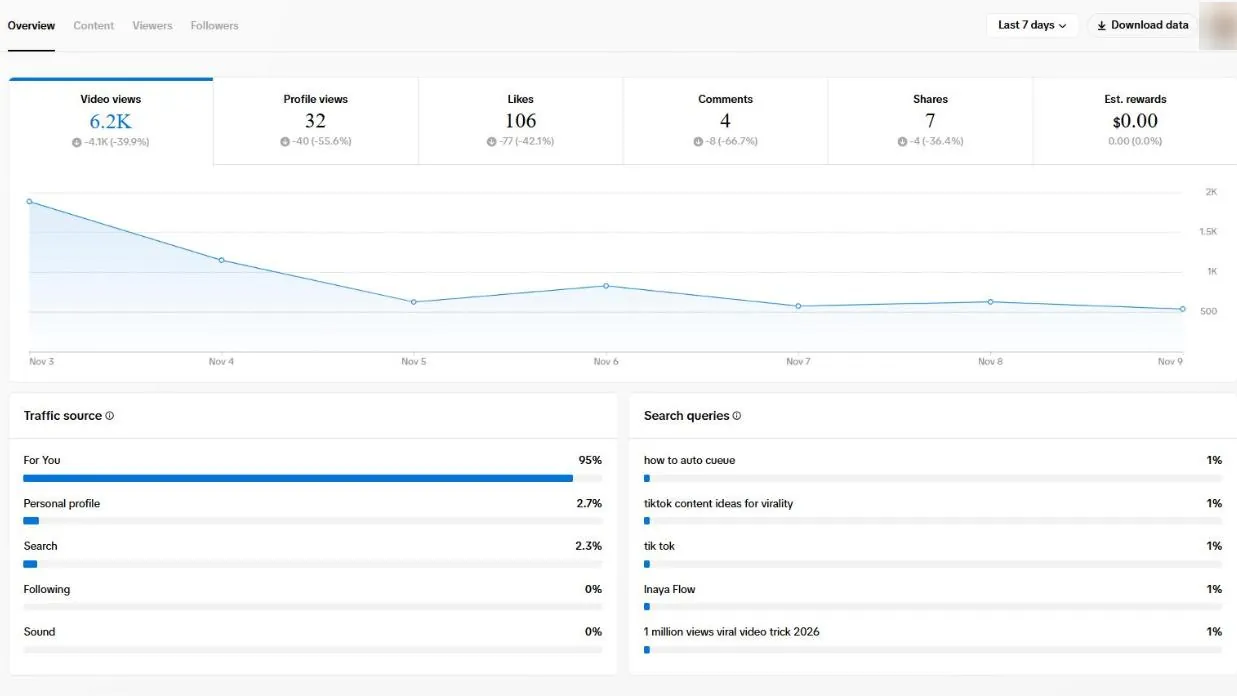
The count appears in the Studio overview (our Studio guide shows the layout). The list is the part that gets the searches.
The rules for seeing who viewed your profile
TechCrunch reported on TikTok's support page, which says the feature is "only available to users who are above the age of 16 and have fewer than 5,000 followers." It covers the past 30 days. It is opt-in, and you can turn it on or off at any time. TechCrunch also says reverse engineers first spotted it in TikTok's app code in January 2022, that it launched in some regions first, and that TikTok later confirmed it was available globally (TechCrunch).
That leaves three conditions:
- Age: over 16.
- Followers: fewer than 5,000. Descript says that above that, you will not be able to see who viewed your profile.
- Setting: profile view history must be on.
If you pass 5,000 followers the list stops being available. The count in analytics does not stop.
How to turn it on
The sources give two routes. Menu names differ, so use whichever you can find.
Route 1: the footprints icon (Linktree).
- Open your profile.
- Tap the footprints icon next to your profile name.
- Tap Turn on.
- Tap the footprints icon again to see the list.
Route 2: settings (Descript, Linktree).
- Profile, then the menu, then Settings and privacy.
- Privacy.
- Profile views.
- Switch it on.
Descript adds that the icon looks like two little feet and was an eye in older versions. Linktree says to update the app if the option is missing. A private account is another cause: one guide excerpt says the option can be missing when the profile is private, but we could not confirm it on a page we read in full.
The trade-off
All three sources say the same thing: when you switch it on, other users can see that you looked at their profiles. Linktree says you cannot view someone else's profile without them knowing, which only holds while you have the setting on, since the feature is opt-in. If you switch it off, you stop seeing your own viewers too. Decide whether you want to be seen browsing before you press Turn on. You can turn it off at any time, according to TechCrunch.
What the list can and cannot tell you
The list is a partial picture:
- It covers 30 days only. Linktree: "this data only reflects the last 30 days."
- Private accounts and people with history off do not appear. Descript says so, so the list is never complete.
- It shows who, not how often. The sources we read give names, not counts per person.
- It is not a list of video viewers. See the next section.
So the list answers one narrow question: which people with the setting on opened my profile recently. Names alone cannot show how many strangers saw you, which is what the analytics count is for.
Can you see who watched a video?
Mostly not, and here the sources conflict.
- Linktree says video viewers cannot be identified: you see the number of views only, even with a Pro account.
- Descript says in its introduction that video views are never itemized, then later describes a "Post views" setting that lists viewers for 7 days, in the same Privacy menu, with a tap on the view count in the bottom-left corner of a video.
Because Descript contradicts itself, we do not treat the video list as confirmed. If you see a "Post views" setting in your own app, you can try it, and expect the same limits as the profile list: partial, short, and visible to the other side too.
What to do with the data
A list of names is mostly curiosity. These uses are more practical, and they are our suggestions, not TikTok guidance:
- Look for patterns after a post. If a video draws a wave of visitors, that is a sign it sent people to your profile. Check whether your bio and pinned videos make a good first impression. Our guide on pinning videos covers the grid.
- Compare views with follows. Linktree's example is a ratio: 1,000 profile views in March and 500 new follows is 50%. A low ratio suggests visitors do not see a reason to follow. A rising ratio means your profile is working.
- Do not chase individuals. A named visitor tells you nothing about intent.
Turning profile visits into follows
Visits only matter if some of them become followers. Linktree frames the check as a ratio of visits to new follows, and the fix is whatever makes a first-time visitor decide quickly. Our checklist, which is our own advice and not a TikTok rule:
- Read your bio as a stranger. Does it say who the account helps and what to expect next? Our bio ideas guide has formats.
- Look at the first nine tiles on your grid. They are what a visitor sees before deciding. A pinned video can put your best work first.
- Check consistency. A profile that covers five unrelated topics gives a visitor no reason to follow. Our guide on finding your niche helps.
- Count visits after a post, not just per month. Note which videos send visitors and which only collect views.
The ratio is a rough guide. A viral video can bring thousands of visits from people who will never follow, so compare ratios on videos of similar reach, and not across your whole account. For more on the follow side, see our guide on getting more followers.
Profile views in your analytics
The count of profile views is also in TikTok Studio. Linktree describes a high profile view rate as a signal worth watching, without giving a benchmark. Descript says the analytics dashboard has three tabs (Overview, Content and Followers). If you need the numbers over a longer window than 30 days, the analytics are the route, and our guide on what makes a good engagement rate shows how to read the other columns. The account type matters too: our guide on personal, creator and business accounts explains which accounts get analytics.
If a profile view count looks odd or stuck, see our guide on TikTok analytics not updating.
Apps that promise to show anonymous viewers
Search for this topic and you will find apps and sites claiming to reveal everyone who looked at you. Descript's guide warns that claims of this kind are false, and we found nothing in the other sources that supports them. TikTok only describes its own feature. Never give your password to a tool that promises more, and read our guide on growth tools before you try any.
Common mistakes
- Expecting a complete list. Private accounts and hidden histories never show.
- Forgetting you will be seen too. Turning it on works both ways.
- Confusing the count with the list. One is analytics, the other a setting.
- Believing video viewer claims. The sources conflict, so verify in your app.
- Reading too much into a name. A visit is not a follow, and not a sale.
- Ignoring the 5,000 cap. If the list disappears when you pass it, nothing is broken.
A clearer cover can lift taps from your profile grid: how to change a TikTok cover.
Seeing views from Personal profile? What each TikTok traffic source means explains it.
How InayaFlow helps with this
The list of visitors shows who looked. It does not show what works. InayaFlow answers the second question, using public data only and never a password.
Give your handle to the free analyzer and you get, in about 30 seconds and with no login, the account's headline numbers, how its latest videos did and which niche it sits in, plus one strength and one weak spot to start from. A free sign-up reveals the remainder. It counts views, likes, comments, shares and saves, but not watch time or retention, and it does not read your profile view history or your Studio data.
Pro tools such as Content Ideas build on your own best videos, so you can make more of what already pulls people to your page. Posting stays manual, we make no promises about results.
Bottom line
To see who viewed your profile, you need to be over 16, have fewer than 5,000 followers and switch on profile view history, which then shows people from the last 30 days and shows you to them too. The list is partial, and you cannot see who watched a video. Use the analytics count and your follow ratio for decisions. To find out which of your videos earn the attention, run the free channel analysis.
Frequently asked questions
Can you see who viewed your TikTok profile?
Yes, if you meet TikTok's rules and switch it on. TechCrunch quotes TikTok's support page: the feature is only available to users above 16 with fewer than 5,000 followers, and it shows viewers from the past 30 days.
Why can't I see who viewed my TikTok profile?
Common reasons from the sources: you have 5,000 or more followers, you are under 16, the feature is switched off, your app is out of date, or the viewer has private-account or view-history settings that hide them. Descript and Linktree both say the list is never complete.
Does TikTok tell people when I view their profile?
Only if you turned profile view history on. TechCrunch, Linktree and Descript all say that once you enable it, other users can see that you viewed their profiles. Linktree also says you cannot view a profile without the owner knowing, which holds only when the setting is on.
Can you see who watched your TikTok video?
Mostly no. Linktree says you only see the number of views, even on a Pro account. Descript describes a post view setting that shows viewers for 7 days, but its own introduction says viewers are never itemized, so its pages conflict. Check your own settings before relying on it.
Do third-party apps show who viewed my TikTok?
We found no support for them in the sources. Descript's guide warns about claims of this kind, and TikTok's official feature is the only route the guides describe. Do not give a password to any app that promises to reveal anonymous viewers.
How many profile views is good on TikTok?
No source gives a benchmark. Linktree offers a simple ratio instead: if 1,000 profile views in a month led to 500 new follows, that is a 50% view-to-follow ratio. Track your own ratio month to month.
Sources
- TechCrunch: How to see who viewed your TikTok profile (June 29, 2023)
- Descript: How to see who viewed your TikTok video: the real answer (November 25, 2026)
- Linktree: Here's how to see who viewed your TikTok profile (November 25, 2026)