Published ·By the InayaFlow team ·8 min read
TikTok Analytics Not Updating or Showing? 9 Causes and Fixes
TikTok analytics not updating, showing zero or missing? How often the data refreshes, the 9 usual causes and a fix order that takes about ten minutes.
If your TikTok analytics are not updating, wait 24 to 48 hours first, because TikTok says its data comes from system calculations and can arrive late. If they are still stuck, check the date range, your account type, a second video, the desktop version and the app version, in that order. Most "broken" analytics are one of those five.
Try it on your own account: type a TikTok username to see its engagement rate from its recent videos.
Engagement rate by views
—
Add your likes, comments, shares or saves.
Engagement rate by followers
—
Add your likes, comments, shares or saves.
Want to know why your TikTok numbers look like this?
Type your TikTok username and InayaFlow compares your own recent videos: your typical views, your engagement rate, what is working and what to post next. Free, no password needed. It starts with no account; a free account unlocks the full report.
Open the full TikTok engagement rate calculator.
Key takeaways
- TikTok's Help Center says Analytics is based on system calculations and data might be delayed depending on the post, and that waiting a few days may fix inaccuracies. It gives no fixed refresh time.
- Graphed says most data refreshes once every 24 hours in daily batches; CapCut says 24 to 48 hours. Both are third-party estimates.
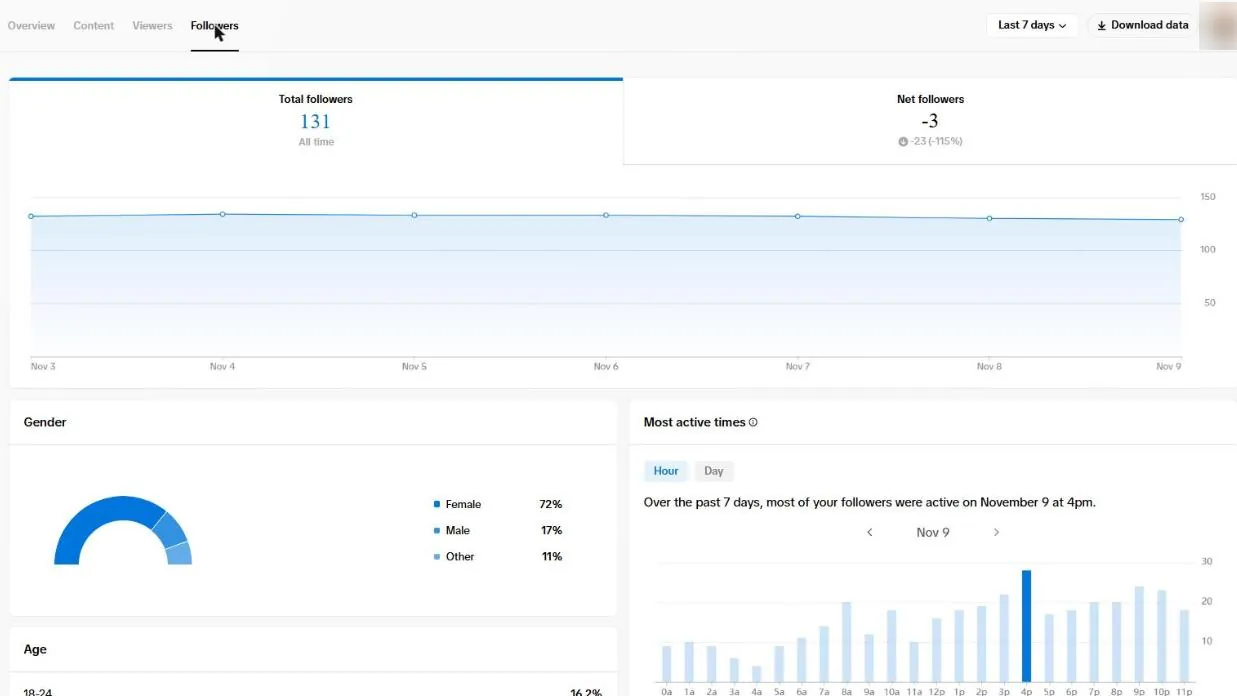
- Per Graphed, the profile follower count is live, while demographics and the follower activity chart update daily, and videos under about 100 views may get no detailed analytics.
- TikTok's Creator Academy lists 7, 28, 60 and 365 day ranges plus a custom range, so an empty chart is often the date range, not a fault.
- Check in this order: date range, account type, a different video, desktop versus phone, app update. Contact support only after about 48 hours of no data.
On this page
You posted a video, opened Studio and found zeros, a flat chart or no Analytics button at all. It feels like a bug, and sometimes it is. Usually it is a delay, a filter or an account setting. This guide lists the nine causes we found across TikTok's own pages and the pages Google shows first for this problem, gives a fix order you can finish in about ten minutes and says plainly which refresh times are TikTok's and which are guesses. For the full tour of what each screen shows once it works, read our TikTok analytics guide.
How often TikTok analytics update
TikTok does not publish a refresh schedule. What it does say is in the Help Center page on using Analytics: the feature is based on system calculations, data may be delayed depending on the post, and waiting a few days can resolve inaccuracies (TikTok Help Center). We could only read that page through a search excerpt, so open it in the app if the wording matters to you.
Third parties fill the gap with estimates:
| Source | Claimed refresh | What it covers |
|---|---|---|
| Graphed | About once every 24 hours, in daily batches tied to UTC | Most analytics data |
| CapCut | 24 to 48 hours, some metrics longer | Typical new data |
| Graphed | A few hours for post cards; 24 to 48 hours for deeper metrics | Content tab |
| Graphed | Live follower total; daily demographics and activity chart | Followers tab |
| Graphed | Up to 24 hours after a session ends | LIVE tab |
The sources do not contradict each other, they just measure different things. A basic post card appears early, the deeper numbers come later and anything built on a model arrives last. None of these figures comes from TikTok, so a delay of a day should not alarm you.
The nine causes, from most to least likely
1. The data is simply late
A new video is the usual case. Graphed says to wait at least 48 hours before judging a post, and the EchoTik page warns against big decisions on the first few hours of reporting. If your video is under a day old, stop here and check tomorrow.
2. The date range does not cover the post
Creator Academy says you can pick the last 7 days, 28 days, 60 days or 365 days, or build a custom report, and that you can download up to 365 days of data at a time (TikTok Creator Academy). A range set to "last 7 days" will show nothing for a post you made last month. EchoTik calls the date range one of the most common reasons charts look empty, and suggests switching to 7 or 28 days first.
3. Your account type has no analytics
Graphed and CapCut both say detailed analytics are for Creator and Business accounts, not Personal ones. TikTok's own Studio launch post limits Studio to creators aged 18 and up (TikTok Newsroom). The sources do not agree on exactly who gets access, so check your own menu: if there is no Analytics entry under TikTok Studio, compare it with our guide to personal, creator and business accounts.
4. The video has very few views
Graphed says videos with fewer than about 100 views may not get detailed analytics. That is a third-party claim, not a TikTok rule. If the post is quiet, the lack of detail may be a symptom of low reach, not a reporting fault. Our guide to getting no views covers that side.
5. You are looking at the wrong tab
The follower total on your profile is live, but the chart in Studio is daily, and the Content tab can list a post before its deeper numbers are ready. Compare the same tab and the same range before you decide something is stuck.
6. A temporary app glitch or an old version
CapCut lists clearing the app cache and updating the app among its five fixes. These are third-party fixes, so we cannot say how often each one applies today.
7. Phone versus desktop
EchoTik suggests opening analytics on desktop to rule out a mobile display issue. Studio on a computer shows the same account, so a number that appears there but not on your phone points to the app, not your data. Our TikTok Studio guide shows where the desktop analytics sit.
8. Business Center or team permissions
If you manage the account through a Business Center, EchoTik says a missing permission can hide data. We could not confirm the exact role names, so ask the account owner what level you have.
9. A metric disappeared or changed
Sometimes the number is not broken but redefined. TikTok moves, renames and removes metrics. Our guide to traffic sources shows one example where a label ("Other") is never explained. Demographics are also estimates: Creator Academy says age, gender and location are based on predictive models, not confirmed user data.
The ten-minute fix order
Work down this list and stop when the numbers return.
- Check the clock. Is the video under 24 hours old? If yes, wait.
- Set the range to the last 28 days. Then pick the exact post.
- Confirm your account type and that Analytics appears under TikTok Studio.
- Open a different video. If an older post shows numbers, the account is fine and the new post is just late.
- Open the same screen on desktop. A difference points to the app.
- Update the app and restart it. Clear the cache if you can find it in settings.
- Turn off any VPN. A search excerpt of one page says some TikTok areas, analytics among them, refuse to load behind a VPN. We could not confirm that on TikTok's side.
- Wait another day. TikTok's own advice is to give it a few days.
- Contact support only after about 48 hours with the details below.
What to send to support
EchoTik lists seven things to gather before you write: your username, a video link, the date range, the missing metric, your device and app version, the platform and a screenshot. A short message with all seven gets a faster answer than "my analytics are broken".
When the numbers look wrong but are not broken
Three situations make creators think analytics are failing when they are working.
- Estimates differ from other tools. Creator Academy says age, gender and location come from predictive models. A third-party dashboard can disagree with Studio on audience splits without either being wrong. Differences in how each tool counts the same day, or a UTC cut-off, can move a number across a date boundary.
- A post that was edited or re-uploaded. A replaced video is a new post with a fresh clock, so its chart starts again from zero.
- A profile follower count that jumps while the chart lags. The live total can move first because the Followers tab is a daily batch. Compare the two only after the next daily refresh.
Keep a weekly note of views, followers and your top post. A written baseline makes a real outage obvious, because a missing week stands out against it.
What not to do
- Do not delete and repost a video because its analytics are empty. You lose the post's history for no reason.
- Do not judge a video in its first hours. Early numbers are partial.
- Do not trust a refresh time as a promise. None of the quoted figures comes from TikTok.
- Do not buy a third-party "analytics fixer". It cannot change TikTok's data.
A backup view while Studio is behind
Studio's private numbers (traffic sources, search queries, watch time) live only inside TikTok. The public numbers do not. Your profile shows followers, likes and video counts, and each video shows its public view count. A free tool such as our follower count checker reads those public figures for any username and shows the time they were read, which is enough to log a weekly snapshot while Studio catches up. It cannot reproduce private data. Our guide to TikTok follower count history shows how to keep that weekly log.
For a sense of scale, in our viral study of 10,124 trending US videos the median video had 34,000 views and 7.6% passed 1M, so compare your own numbers with your own earlier videos, not with trending ones.
If the dip is real, TikTok views going down: 7 causes is the next read.
How InayaFlow helps when Studio is slow
Studio's private screens, watch time and retention are outside InayaFlow's reach, so it cannot unstick an Analytics page. It gives you a second reading of the same account built from public numbers only.
Give your handle to the free channel analysis. There is no password step, and roughly 30 seconds later you see profile totals, how recent videos performed, your standout video next to an ordinary one, your niche, one strength and one weak spot. Signing up for free shows the remaining findings. Since it never touches Studio, it still answers on the days Studio is behind.
When you are ready to plan rather than wait, the Pro plan adds its idea, script, hashtag, timing and video-breakdown tools. You post by hand, and nothing on this page promises extra views.
Bottom line
Most stuck TikTok analytics are a delay, a date range or an account setting. Wait a day, set the range to 28 days, check your account type, open a second video, try desktop and update the app. Only then write to support, with the seven details. Want a backup read of your public numbers while you wait? Use the free channel analysis.
Frequently asked questions
How often do TikTok analytics update?
TikTok gives no fixed time. Its Help Center says data is based on system calculations and may be delayed depending on the post. Graphed says most data refreshes about once every 24 hours and CapCut says 24 to 48 hours. Treat those as estimates.
Why do my TikTok analytics show zero?
The common reasons are a brand-new video that has not been processed yet, a date range that does not cover the post, an account type without analytics and a video with very few views. Check the range first, then wait a day.
Why can I not see Analytics on my TikTok account?
Third-party pages say detailed analytics need a Creator or Business account, not a Personal one. TikTok's own Studio announcement describes it as a tool for creators aged 18 and up, so your age and account type are the two things to check first.
Is my follower count live but the chart is old?
Graphed calls that normal: the profile follower number is live, while demographics and the activity chart update once a day. Wait for the next daily batch before you worry.
When is it time to contact TikTok support?
EchoTik and CapCut both suggest waiting a day or two first. If nothing appears after about 48 hours and the date range, account type and app version are all fine, contact support with your username, a video link and a screenshot.
Can I see my TikTok numbers somewhere else while analytics are down?
Public numbers stay visible on your profile. A free follower count checker can read your public followers, likes and video count along with when it was read. It cannot show private Studio data such as traffic sources.
Sources
- TikTok Help Center: How to use TikTok Analytics (November 25, 2026)
- TikTok Creator Academy: Analytics introduction (November 25, 2026)
- Graphed: How often do TikTok analytics update? (November 25, 2026)
- CapCut: 5 easy ways to fix TikTok analytics not showing issue (June 16, 2025)
- EchoTik: TikTok analytics not showing? 11 causes and fixes for 2026 (September 7, 2026)